FMS (Flow Management System): Track Every Order Step with Planned vs Actual Time
FMS flow management system explained: map steps, assign doers and TAT, compare planned vs actual time, catch delays and report them on an MIS dashboard.
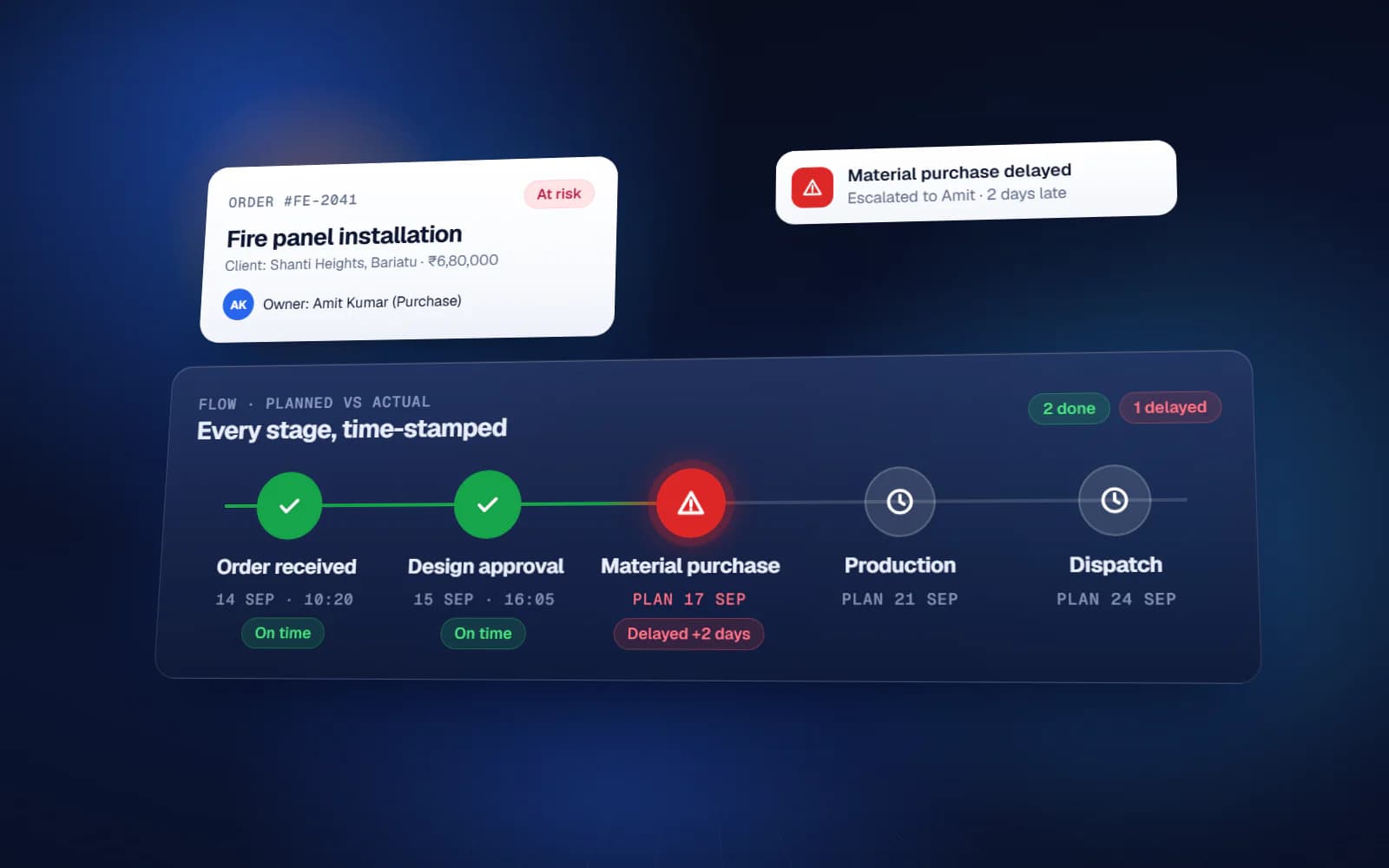
An FMS, or flow management system, answers the question every owner of a growing business asks ten times a day: where is this order right now, and is it late? In Indian SME practice, an FMS is a sheet or system in which every order or job moves through a fixed list of steps, each step has a named doer and an allowed time, and the system records the planned time and the actual time for each step. The gap between the two is the delay, and it is visible the moment it happens. This guide explains how an FMS flow management system works, how to design one for your process, how to build it in Google Sheets, and how the MIS dashboard turns it into reporting.
What FMS means in business
FMS is used for many things — facility management, flight management, even a software module name. In the business-systems world of Indian small and mid-sized companies, it usually means a flow management system, sometimes also called a flow monitoring sheet or a flowchart monitoring system. The idea is the same in every version: draw the flow of work as steps, then monitor every order against that flow.
It is different from a task list. A task list tracks one-off jobs. An FMS tracks a repeating process — order to delivery, enquiry to quotation, purchase request to goods received, hiring request to joining — where the same steps happen every time in the same sequence.
The building blocks: steps, doers and TAT
Every FMS is built from four pieces of information for each step:
- Step — what has to happen, in one line
- Doer — the one role responsible for completing it
- TAT (turnaround time) — how long the step is allowed to take, in hours or days
- Trigger — what starts the clock, usually the actual completion of the previous step
Example: order to delivery FMS
Here is how a simple order-to-delivery flow for a trading or manufacturing business might look. Your steps and times will be different; the structure is what matters.
| Step | Doer | TAT | Clock starts from |
|---|---|---|---|
| 1. Order received and entered | Sales coordinator | 2 hours | Customer confirmation |
| 2. Order confirmation sent to customer | Sales coordinator | 4 hours | Step 1 actual |
| 3. Material availability checked | Stores | 1 day | Step 2 actual |
| 4. Purchase or production planned | Purchase / Production | 1 day | Step 3 actual |
| 5. Goods ready and quality checked | Production / QC | As per order | Step 4 actual |
| 6. Invoice and dispatch documents prepared | Accounts | 4 hours | Step 5 actual |
| 7. Dispatched | Dispatch | 1 day | Step 6 actual |
| 8. Delivery confirmed | Dispatch / Sales | As per route | Step 7 actual |
| 9. Payment follow-up | Accounts | Per credit terms | Step 8 actual |
Planned vs actual time: how an FMS spots delays
For each order and each step, the FMS keeps two timestamps. Planned is calculated automatically: the actual time of the step that triggers it, plus the TAT. Actual is filled in when the doer marks the step done. If actual is later than planned, the step is delayed, and the delay in hours or days is recorded against that doer.
Two things make this powerful. First, a delay shows up at the step where it happened, not three steps later when the customer calls. Second, the plan of every later step shifts with it, so everyone downstream sees realistic dates instead of the original promise.
Pending, done and delayed — the three states that matter
- Pending — planned time is in the future and the step is not done yet
- Overdue — planned time has passed and the step is still not done; this is where attention goes
- Done late — completed, but after the planned time; this is what feeds the doer's delay score
How to build an FMS in Google Sheets
Many teams run their first FMS in Google Sheets. A workable structure:
- A Google Form or an input tab to create each new order with its date, customer and key details
- The main FMS tab: one row per order, and for each step a group of columns — Planned, Actual, Status and Delay
- Formulas that calculate Planned from the previous step's Actual plus TAT, and Delay as Actual minus Planned
- Conditional formatting so an overdue step turns red
- A setup tab listing each step, doer and TAT, so times can be changed without editing formulas
- A filtered view per doer showing only the steps pending with them
Two practical warnings. Actual time should be recorded when the doer marks the step done, not typed in later from memory, or the whole system loses its value. And Sheets formulas that depend on today's date recalculate often, so large sheets can become slow — keep closed orders in an archive tab.
The MIS dashboard: the reporting side of FMS
The FMS is where work is tracked. The MIS (management information system) dashboard is where the owner reads it. It pulls from the FMS and shows the numbers that matter on one screen:
| MIS view | Question it answers |
|---|---|
| Orders pending by step | Where is work piling up right now? |
| Overdue steps by doer | Who needs help or a nudge today? |
| On-time percentage by step | Which step is the bottleneck in the process? |
| Average delay by doer | Who is consistently late, and by how much? |
| Order-to-delivery time trend | Are we getting faster or slower month on month? |
Reviewed weekly, these views turn arguments into facts. If step 3 is late on most orders, the problem is the step or its TAT, not the person. If one doer is late on every step, it is a workload or training question.
Rules that keep an FMS honest
- One doer per step, by role, with a backup
- TATs agreed with the doers, not imposed; start generous and tighten after a month of data
- Only the doer marks their step done; nobody fills in actuals for others
- Delays are reviewed weekly, and every repeated delay gets a reason and a fix
- No parallel tracking on WhatsApp — if it is not in the FMS, it did not happen
When to move an FMS off Google Sheets
For many small and mid-sized teams, Google Sheets with Apps Script is quick and cheap to run. It starts to strain when orders run into the thousands, when many people edit at once, when doers must see only their own steps, or when you need several flows (sales, purchase, production) feeding one MIS. At that point a web app is more reliable.
Yuktantra's FMS combines the flow side — every order or job followed through its steps, each with an owner and a planned date — with an MIS dashboard: real-time dashboards, operational KPIs, custom reports, alerts and flags when something is stuck, and role-based access. We build it on Google Sheets where that fits and as a web app when volume or permissions outgrow Sheets. The scope is written first and the quote is fixed for that scope.
An FMS flow management system does not make work faster by itself. It makes every delay visible at the step where it happens — which is the only place it can be fixed.
FAQ
What is the full form of FMS in business?
In Indian business-systems practice, FMS usually stands for flow management system (also called a flow monitoring sheet): each order or job moves through defined steps, and every step has a doer, an allowed time and a planned versus actual record.
How does an FMS Google Sheet work?
Each order is a row. For every step there are Planned, Actual, Status and Delay columns. Planned is the previous step's actual time plus the allowed TAT; the doer fills Actual when done; formulas calculate the delay and highlight overdue steps.
What is the difference between FMS and MIS?
FMS tracks the flow of each order through its steps. MIS is the reporting layer that summarises that data — pending by step, overdue by doer, on-time percentages and trends — on a dashboard for management.
What is TAT in FMS?
TAT is turnaround time: the time a step is allowed to take. The planned time of a step is calculated from the actual completion of the step before it plus its TAT.
Which processes can be tracked with an FMS?
Any process that repeats with the same steps: order to delivery, enquiry to quotation, purchase request to goods received, job work, service complaints, and hiring to joining.