Student Attendance Using QR Code: A Practical Guide for Schools
How student attendance using QR code works in a school — hardware, gate vs classroom, pros and cons vs registers and biometric, parent alerts and privacy.
Student attendance using QR code is the cheapest way for a school to move off the paper register without buying special hardware. Every student's ID card carries a QR code; a teacher's phone scans it; the system marks the child present and tells the parents of those who did not come. This guide covers how it works, what you need, where to scan, how it compares with registers, apps and biometric devices, and the privacy points to settle first.
How student attendance using QR code works
- Each student gets an ID card with a QR code. The code holds only an ID number that points to the student's record — not the name, phone or address.
- The teacher opens the attendance screen for the section on a phone or tablet and scans each card.
- The system matches every scan to a student in that section and marks them present. A good system flags a card from another section instead of accepting it.
- Students not scanned are shown to the teacher for a quick check — some are late, some forgot the card — and the rest are marked absent.
- Parents of absent students get an alert, and the day's attendance feeds monthly reports and the exam-eligibility count.
What hardware a school attendance app needs
| Item | What you need | Notes |
|---|---|---|
| Scanner | Any smartphone or tablet with a working camera | Teachers' own phones work; keep one spare school device per floor |
| ID cards | Printed cards with a QR code per student | Laminate them; a scratched code slows the line |
| Internet | Mobile data or school Wi-Fi | Ask the vendor what happens if the network drops mid-scan |
| Software | Attendance module with QR scanning | Should also allow manual marking for a forgotten card |
| Printer | For reprinting lost cards | Budget for a few replacements every month |
There is no fingerprint reader to maintain, no device per classroom, and nothing to install in the walls. That is the main reason schools pick QR over other automated methods.
Gate or classroom: where to scan
At the school gate
Scanning at the gate records who entered the campus and when, which is useful for late arrivals and safety. But at 7:45 am a few hundred students arrive in ten minutes, so a single scanner creates a queue. A gate scan also shows the child was on campus, not that they reached class.
In the classroom
Scanning in the first period is calmer. The class teacher knows every face, so a student holding a friend's card is caught on the spot. The record is per section, which is what registers, report cards and board eligibility actually need. Most schools start here and add gate scanning later only if they need entry times.
QR attendance vs register, tap grid and biometric
| Method | Speed per section | Cost | Weak spot |
|---|---|---|---|
| Paper register | A few minutes, plus monthly tallying | Lowest | No parent alerts; totals done by hand |
| App tap grid | Fast — one tap per absent child | Low | Relies on the teacher's honesty; no card needed |
| QR code scan | Fast once students queue with cards | Low — phones and printed cards | Forgotten or lent cards |
| RFID card reader | Very fast at a gate | Readers and cards to buy | Hardware per entry point; lent cards |
| Biometric (fingerprint or face) | Fast per person, slow for a queue | Highest — devices plus upkeep | Sensitive data; devices need upkeep and can fail |
No method stops every trick. A lent QR card and a lent RFID card fail the same way, which is why a teacher who can see the class still matters. The real gain from any digital method is what happens after marking: alerts, reports and eligibility counts without a calculator.
Parent alerts on SMS and WhatsApp
The alert is where attendance software earns its keep. A parent who learns at 8:30 am that their child did not reach school can act that morning. Keep alerts short: the child's name, the date, 'marked absent', and a number to call. Send them once — an alert repeated because a teacher corrected and re-saved the register teaches parents to ignore the school's messages. For SMS in India the template must be registered under TRAI's DLT rules first; on WhatsApp it goes as an approved utility template.
Privacy: what to settle before printing cards
- Put only an opaque ID in the QR code. Anyone can scan a QR with a phone camera, so a code that contains a name or phone number leaks it.
- India's Digital Personal Data Protection Act, 2023 treats anyone under 18 as a child. The 2025 rules exempt schools from some child-data conditions for educational activities and student safety, but only for those purposes — attendance data should not be reused for anything else.
- Biometric data is far more sensitive than a QR ID. If you do consider it, get legal advice and parents' written consent first.
- Limit who sees attendance: the class teacher, the office and the child's own parents, not every staff login.
- Decide what happens to a lost card — deactivate it and print a new one — so old cards cannot be used.
How attendance works in Vidyalaya
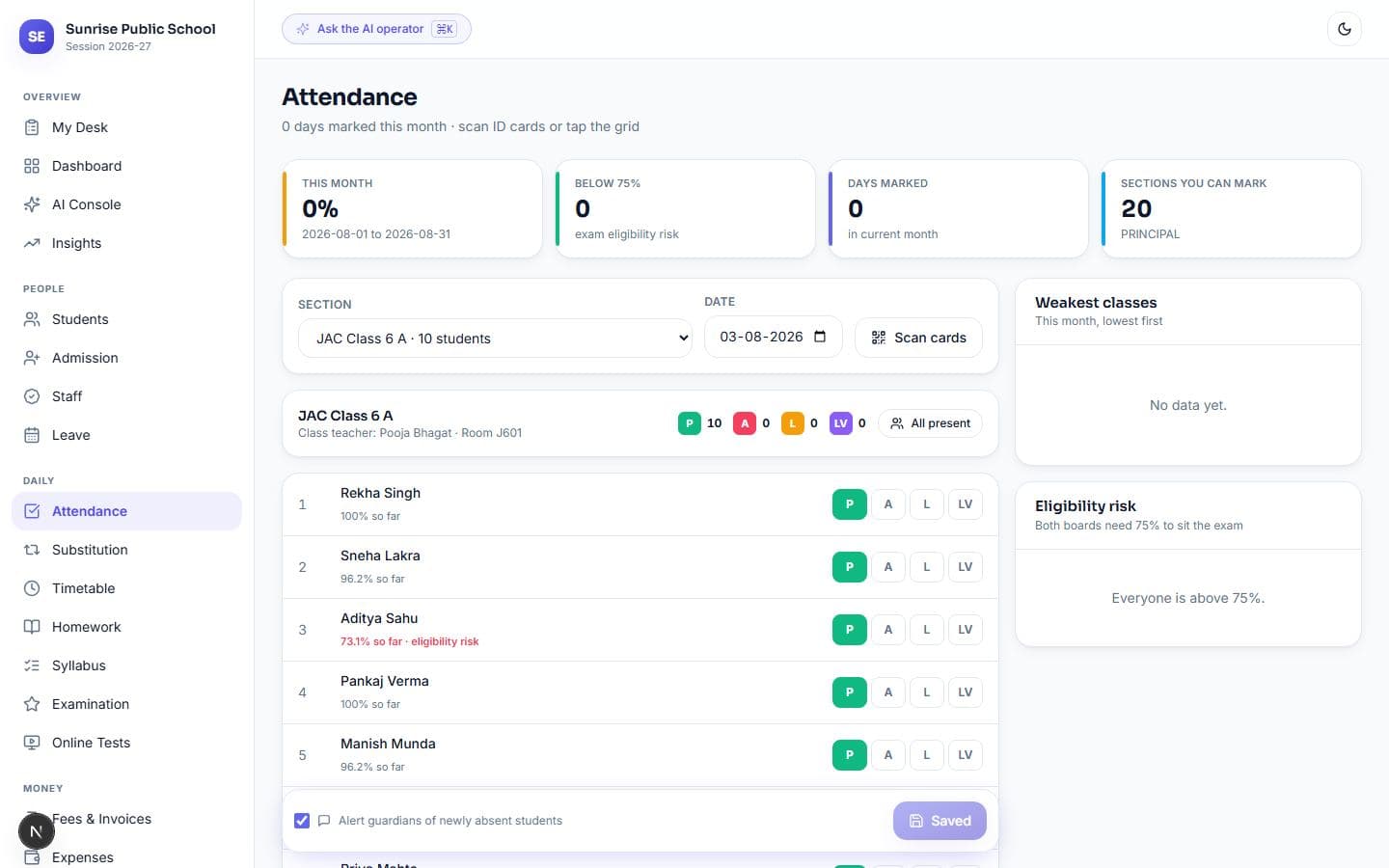
Vidyalaya, our school ERP, gives teachers two ways to mark students: scan the QR on each ID card, or tap names on a grid that cycles through statuses. A section takes about 40 seconds. ID cards with the QR print from the system on the school letterhead. It works in a browser, so there is nothing to install.
- Absence alerts go to parents on WhatsApp the same morning, only for students newly marked absent — re-saving never messages a family twice
- Messages fall back from WhatsApp to SMS to email, and quiet hours stop at 21:00
- Everyone below the 75% attendance line that JAC and CBSE both require for exams is listed, so a child is flagged in September, not February
- Staff attendance runs in the same system and feeds payroll and substitution
- Parents see a month of their child's attendance, day by day, in the parent portal
Marking by QR or the tap grid covers the daily work without extra hardware. Plans are flat per school, from ₹999 a month, with a 14-day free trial.
FAQ
How does student attendance using QR code work?
Each student's ID card carries a QR code linked to their record. The teacher scans the cards with a phone, the system marks those students present, and the rest are reviewed and marked absent.
Do we need special hardware for QR attendance?
No. A smartphone or tablet with a camera, printed ID cards with QR codes, and an internet connection are enough. There is no reader to install.
Can students cheat QR code attendance?
A student can carry a friend's card, which is why classroom scanning by a teacher who knows the class works better than an unattended gate scanner.
Is there a free school attendance app?
Some exist for basic marking. Check whether parent alerts, reports and data export are included, and who pays for SMS or WhatsApp messages.
Is QR attendance better than biometric for schools?
For most schools, yes: it is cheaper, needs no devices and stores no fingerprints or face data. Biometric suits entry points where speed matters and consent is in place.