Task Delegation System: Stop Chasing Your Team on WhatsApp
Task delegation system for Indian SMEs: how to assign with due date and priority, track status, set follow-up and escalation rules, and read the dashboard.
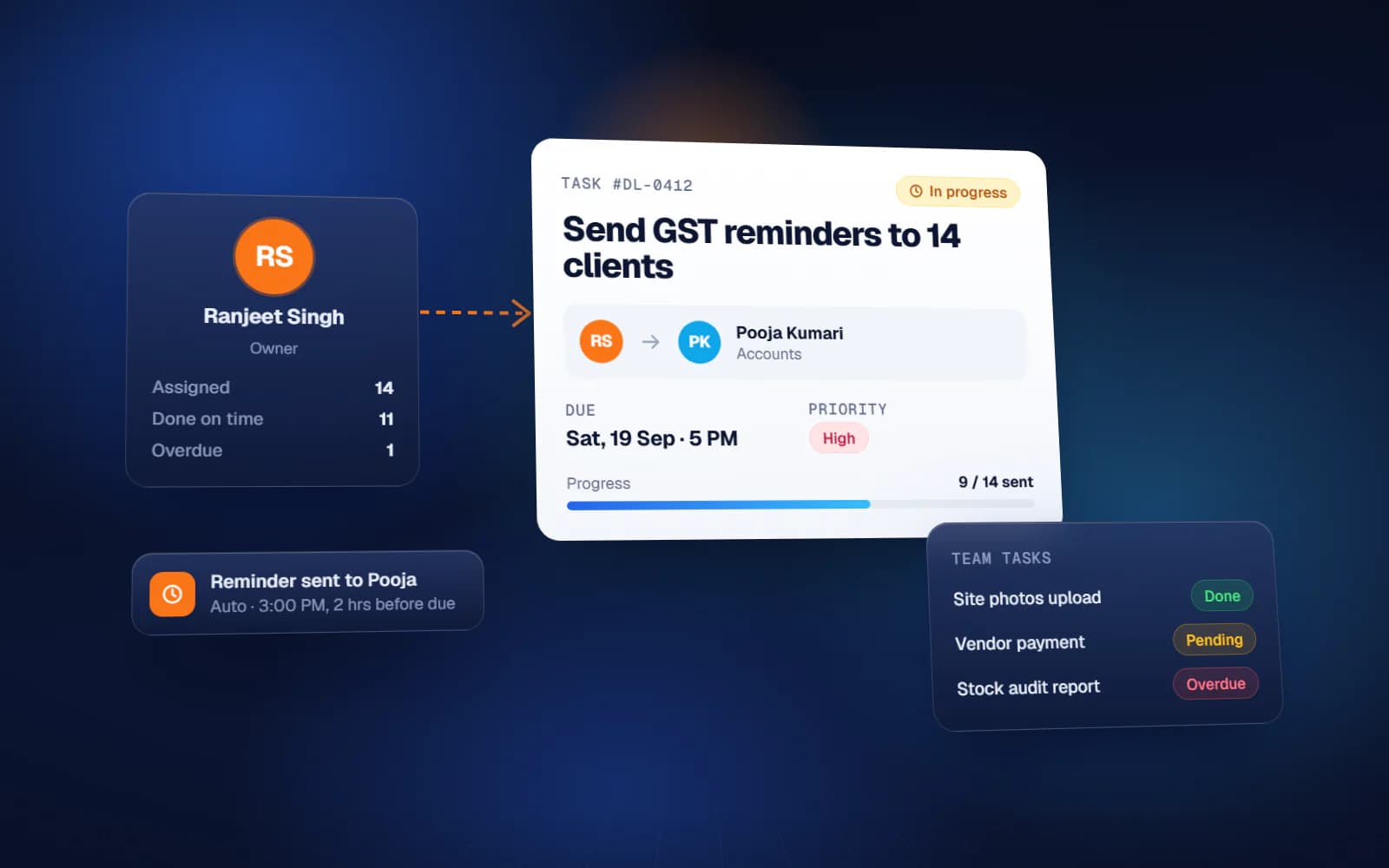
If your day is spent sending 'Kya hua?' on WhatsApp, you do not have a people problem. You have a missing task delegation system. Work is being handed out — by voice note, in a group, on a call — but it is never written down in one place with an owner, a date and a status. So the only way to know whether it happened is to ask, and the owner of the business becomes the company's full-time follow-up department. This guide explains how a delegation system works, what every task must carry, the follow-up and escalation rules that keep it honest, and what the owner should see on the dashboard.
Why WhatsApp is a bad place to delegate
WhatsApp is excellent for talking and terrible for tracking. A task given in a group competes with forwards, photos and customer messages. There is no due date field, no status, and no way to see all pending work for one person. When someone says 'I never got that message', nobody can prove otherwise without scrolling for ten minutes.
- Tasks are scattered across personal chats, groups and calls
- No list shows everything pending with one person
- Deadlines are said once and forgotten by both sides
- Completion is a thumbs-up emoji, not a checked result
- At month-end there is no record of who delivered on time
Keep WhatsApp for conversation. Move the task itself into a system.
What a task delegation system is
A task delegation system is a shared register of every piece of work handed from one person to another, with a clear owner, deadline, priority and status, plus rules for what happens when a deadline is missed. It differs from a personal to-do app because it records who gave the task, who owns it, when it was due and whether the result was reviewed and accepted.
The fields every delegated task needs
Whether you use a sheet or software, each task should carry these fields. If a field is missing, that is where the follow-up calls come from.
| Field | Why it matters |
|---|---|
| Task ID | So a task can be referred to without describing it again |
| Task description | One clear outcome, not an activity — 'Send revised quote to Sharma Traders', not 'look into Sharma' |
| Assigned by | Who gave the task and who will review it |
| Assigned to (doer) | One named owner, never 'the team' |
| Given on / Due date | The deadline agreed by the doer, not only announced by the boss |
| Priority | High, medium or low, so the doer knows what to drop when two tasks clash |
| Status | Not started, in progress, waiting on someone, done, approved |
| Completed on | Actual date, so planned versus actual can be measured |
| Remarks / proof | A link, file or note showing the result |
How to write a task so it cannot be misunderstood
Start with a verb, name the result, and add the recipient or place. 'Collect the payment from Gupta Hardware and update the ledger' leaves no room for 'I called them'. If the task needs more than one person, split it into separate tasks with separate owners.
Delegation sheet format in Excel or Google Sheets
Most teams can start with a delegation sheet before buying anything. Make one row per task with the columns above, keep Status as a dropdown, and add a formula column that shows 'Overdue' when today is past the due date and the status is not done. Then:
- Give each doer a filter view of their own open tasks
- Sort by due date, then priority, so the top of the list is always today's work
- Protect the 'Assigned by' and 'Due date' columns so deadlines cannot be quietly edited
- Keep a second tab for completed tasks so the main list stays short
A shared Google Sheet has one advantage over an Excel file on one computer: everyone sees the same list on their phone, live.
Follow-up rules that replace chasing
The point of a system is that the owner stops following up personally. That only works if the rules are fixed in advance and apply to everyone.
- Every task is acknowledged by the doer the same day, with the due date confirmed or renegotiated
- The doer updates status, not the manager — no update by the end of the day counts as not started
- A deadline can be changed only once, with a reason, before it is missed
- One daily check at a fixed time: the manager filters overdue tasks and nothing else
- Completed means reviewed — the person who assigned it marks it approved or sends it back
Escalation: what happens when a deadline is missed
Escalation is not punishment. It is a rule about who gets to know, and when, so that a delay is fixed before it becomes a customer problem.
| Stage | Who is informed | What they do |
|---|---|---|
| Due today | Doer | Finishes it or flags a blocker |
| 1 day overdue | Doer and the person who assigned it | Agree a new date or remove the blocker |
| 3 days overdue | Department head | Reassign, add help or change priority |
| High-priority task overdue | Business owner | Decides the same day |
The delegation dashboard: what the owner should see
The owner does not need to see every task. A useful dashboard answers four questions in under a minute:
- How many tasks are open, and how many are overdue, per person
- Which high-priority tasks are late right now
- On-time completion percentage per person for this week and this month
- Which tasks keep getting their deadlines extended
Over a few months this becomes a performance history — the record of who delivers on time. That is far more useful in an appraisal than an impression.
Common mistakes when setting up a delegation system
- Logging every small request, so the list becomes too long to read
- Letting the boss set deadlines without the doer agreeing to them
- Allowing 'done' without review, so half-finished work is closed
- Running the sheet and WhatsApp in parallel for task assignment — pick one
- Starting with software that is heavier than the team is ready for
When to move from a sheet to a proper system
A delegation sheet is enough while one person maintains it and the team is small. Move up when tasks run into the hundreds, when you need approval steps, when managers want their own view, or when the same kind of task keeps being created by hand.
Yuktantra's delegation system covers task assignment, deadline and priority tracking, status updates, a review and approval flow, team accountability and performance history. Overdue tasks show up for both the doer and the manager and stay in the doer's history. We have also built a delegation module inside a custom ERP. Many teams start with a structured delegation sheet and move to the fuller system later — we set up whichever your team will actually use, with the scope written down first and a fixed quote for it.
A task delegation system will not make people more responsible overnight. It makes responsibility visible, and that is usually enough to end most of the WhatsApp chasing.
FAQ
What is a task delegation system?
It is a shared register of work handed from one person to another, where each task has one owner, a due date, a priority and a status, plus rules for follow-up and escalation when a deadline is missed.
How is a delegation system different from a to-do app?
A to-do app is for your own tasks. A delegation system records who gave the task, who owns it, the deadline, and whether the result was reviewed and accepted, so it builds a record of who delivers on time.
What should a delegation sheet format in Excel include?
Task ID, task description, assigned by, assigned to, given on, due date, priority, status, completed on and remarks. Add a formula that marks a task overdue when the due date has passed and it is not done.
How do I delegate tasks to employees effectively?
Write each task as one clear outcome, give it one owner, agree the deadline with that person, set a priority, and make the doer responsible for updating status. Review completed work before closing it.
Can a task delegation system work with WhatsApp?
WhatsApp is fine for conversation, but the task itself should live in the system so it has an owner, date and status. Reminders can be sent to WhatsApp, but the record should not depend on chat history.