Manufacturing ERP built around your shop floor
Production planning, BOM, job cards, stores, quality and costing in one system — so you finally know true cost per unit while the job is still running, not a month later.
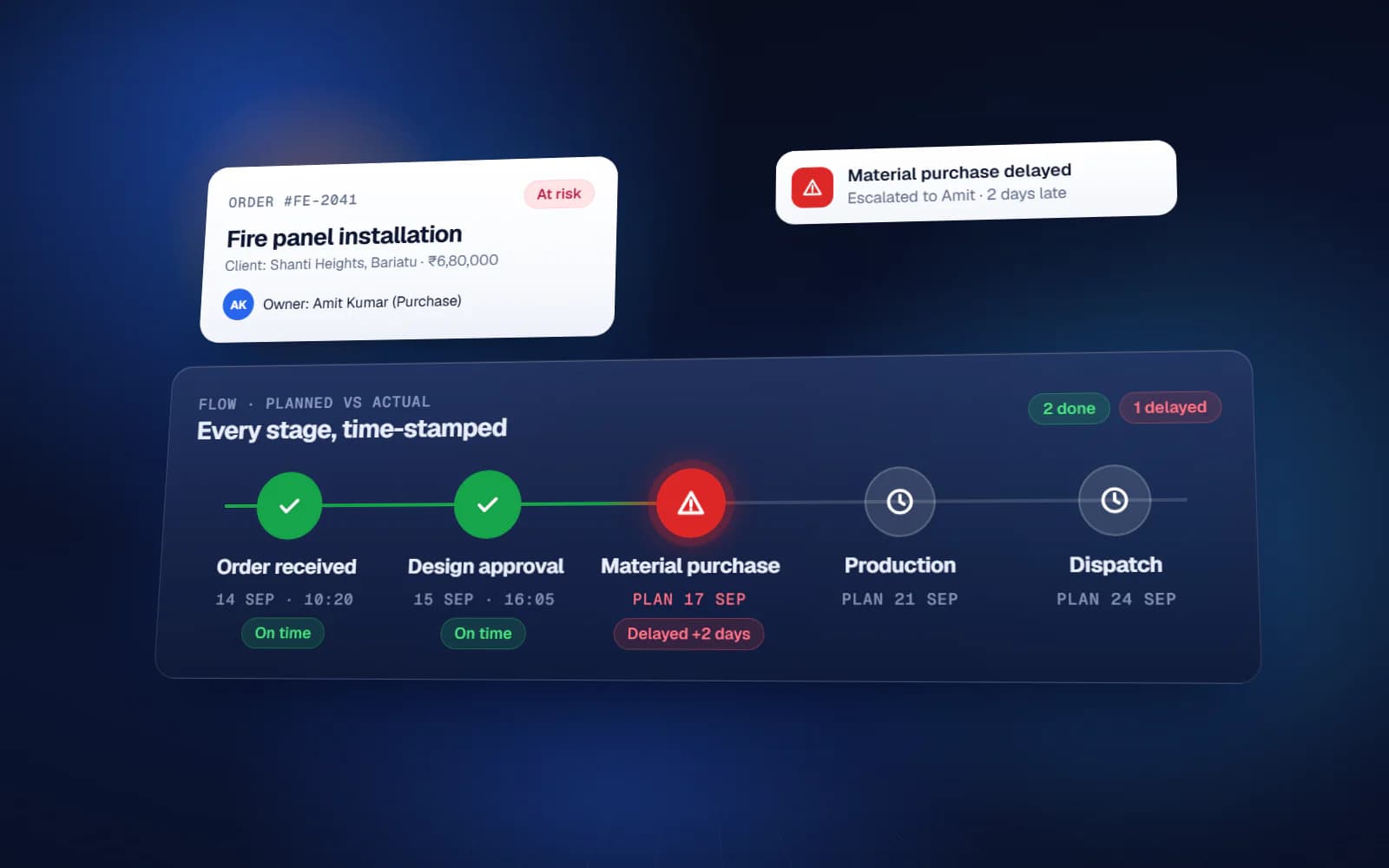
If this sounds like your factory
- Production plan lives in one Excel file, stores keeps another, and dispatch runs on WhatsApp
- Nobody can say what a finished unit actually cost until the accountant closes the month
- Raw material shortages are discovered on the shop floor, not in the plan
- Rejection and rework are recorded on paper, so the same defect repeats every quarter
- Job work sent outside is tracked in a diary and reconciled from memory
Manufacturing ERP — what you get
Production planning
Work orders, machine and shift-wise scheduling, live plan-versus-actual.
BOM & routing
Multi-level bill of materials, operation routing, scrap and yield allowances.
Job cards
Operator-level job cards on tablet or mobile, with real-time progress.
Stores & inventory
Raw material, WIP and finished goods, with batch and lot traceability.
Quality control
Inline and final inspection, rejection reasons, and defect trend reports.
Costing
Material, labour and overhead per job — visible while the job is still open.
Purchase & vendors
Indent to PO to GRN, with vendor rate history and pending order tracking.
Job work
Material issued outside, expected return, ageing and reconciliation.
What changes
You know the scope and the cost before we write code
Most failed software projects fail in the first three weeks, not the last three. This is where we spend the effort.
- 01
Discovery
1–2 weeksWe sit with the people who do the work — not only management. Most of the real requirements are in what they have quietly worked around for years.
- 02
Blueprint & estimate
1–2 weeksScope, module list, integration points, timeline and fixed cost. You can take this document to another vendor — that is the point.
- 03
Design
2–3 weeksClickable screens before development. Changing a screen at this stage costs an hour; changing it after build costs a week.
- 04
Development
4–16 weeksTwo-week sprints with a working demo at the end of each one. You see progress continuously instead of waiting for a reveal.
- 05
Testing & UAT
2–3 weeksYour team uses it on real data before go-live. Every issue is logged and closed in writing.
Manufacturing ERP — available in
Frequently asked questions
We already use Tally. Will this replace it?
No. Tally stays as your accounting system. The ERP handles production, stores and costing, and pushes the entries Tally needs. Most factories we work with keep both, and that is usually the right answer.
Our operators are not comfortable with computers.
Job card screens are designed for a tablet with large buttons and almost no typing — usually a scan and a quantity. Training happens on the shop floor with your own work orders, and we stay available daily through the first month.
Can it connect to weighing scales or machines?
Yes, where the equipment supports it. Weighbridges, weighing scales and barcode scanners are straightforward. PLC and machine data integration is possible and is scoped separately during discovery.
How long before it goes live?
A single-plant system typically runs three to five months. Most of that time is spent cleaning up item masters and BOMs — that data work, not development, sets the pace.
Start with the problem, not the software
A 45-minute call. We map where the manual work actually is and tell you whether it is worth building anything at all. No cost, no obligation.
If custom software is the wrong answer for you, we will say so on that call.