A school ERP that makes the registerfinally worth trusting.
Vidyalaya is school ERP software — one system for admission, attendance, fees, examination, payroll and every parent message — with an AI that reads your school's own numbers and tells you what needs attention today. Built for Indian schools running JAC and CBSE side by side.
30-minute walkthrough, on a call or in person. No cost.
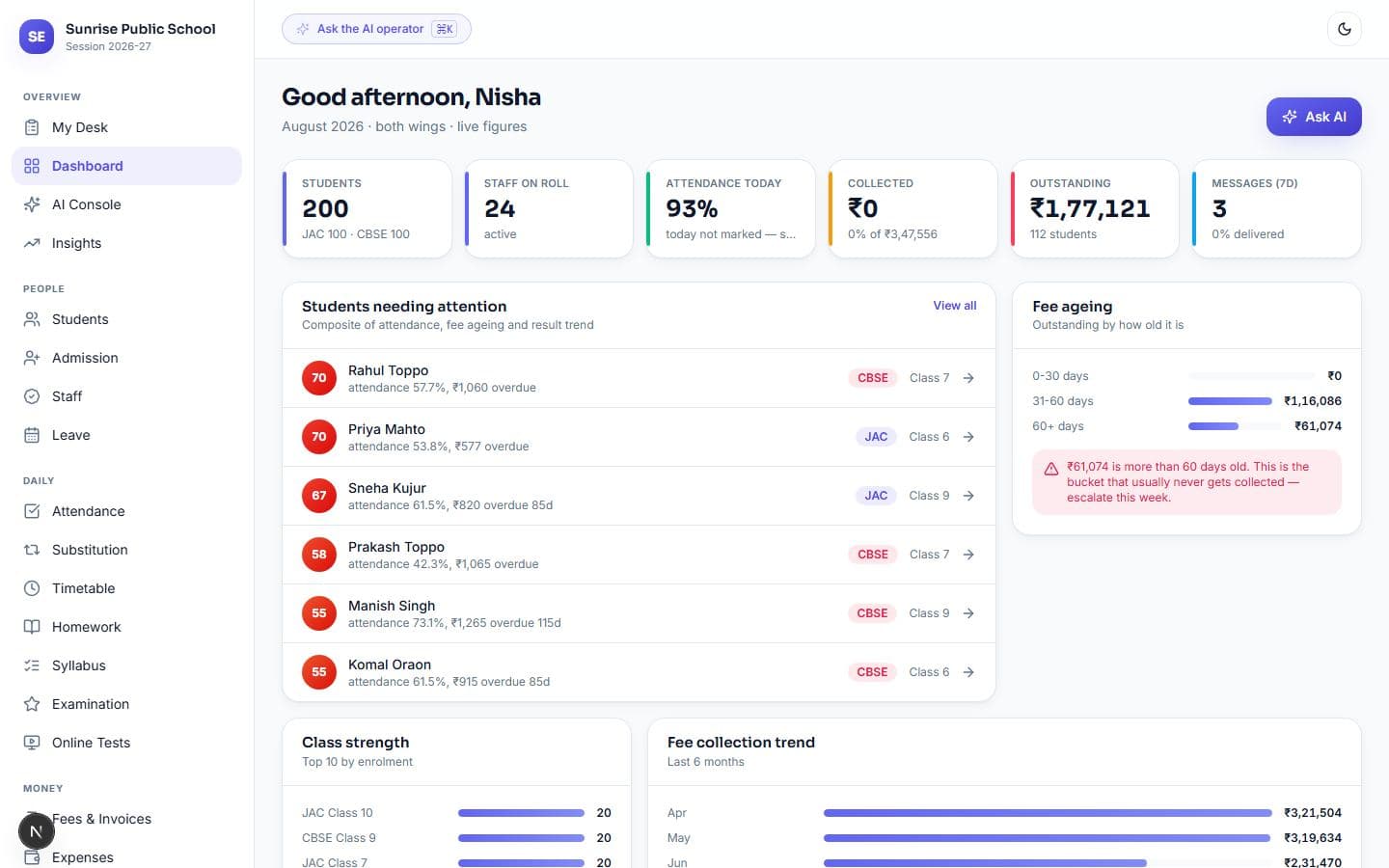
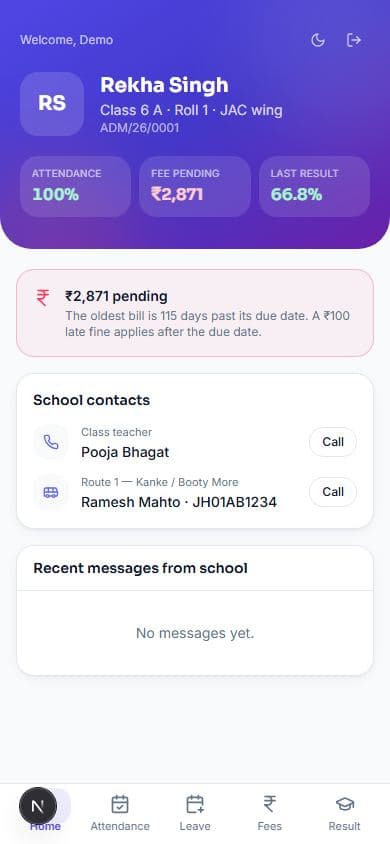
The morning screen — strength, staff, attendance and money, the four numbers a head asks on the way in, with the day they were last touched.
- modules
- 22modules
- operations in the API
- 774operations in the API
- automated tests
- 1,600+automated tests
- days free, no card
- 14days free, no card
What the school actually gains
Not features. The things that change on Monday morning.
Fees stop leaking
Outstanding is aged into 0–30, 31–60 and 60+ day buckets. The 60+ bucket is the one schools never collect — the system names it, and chases it on its own at D-5, due day, D+3, D+7 and D+15.
recovers the 60+ bucketAttendance in under a minute
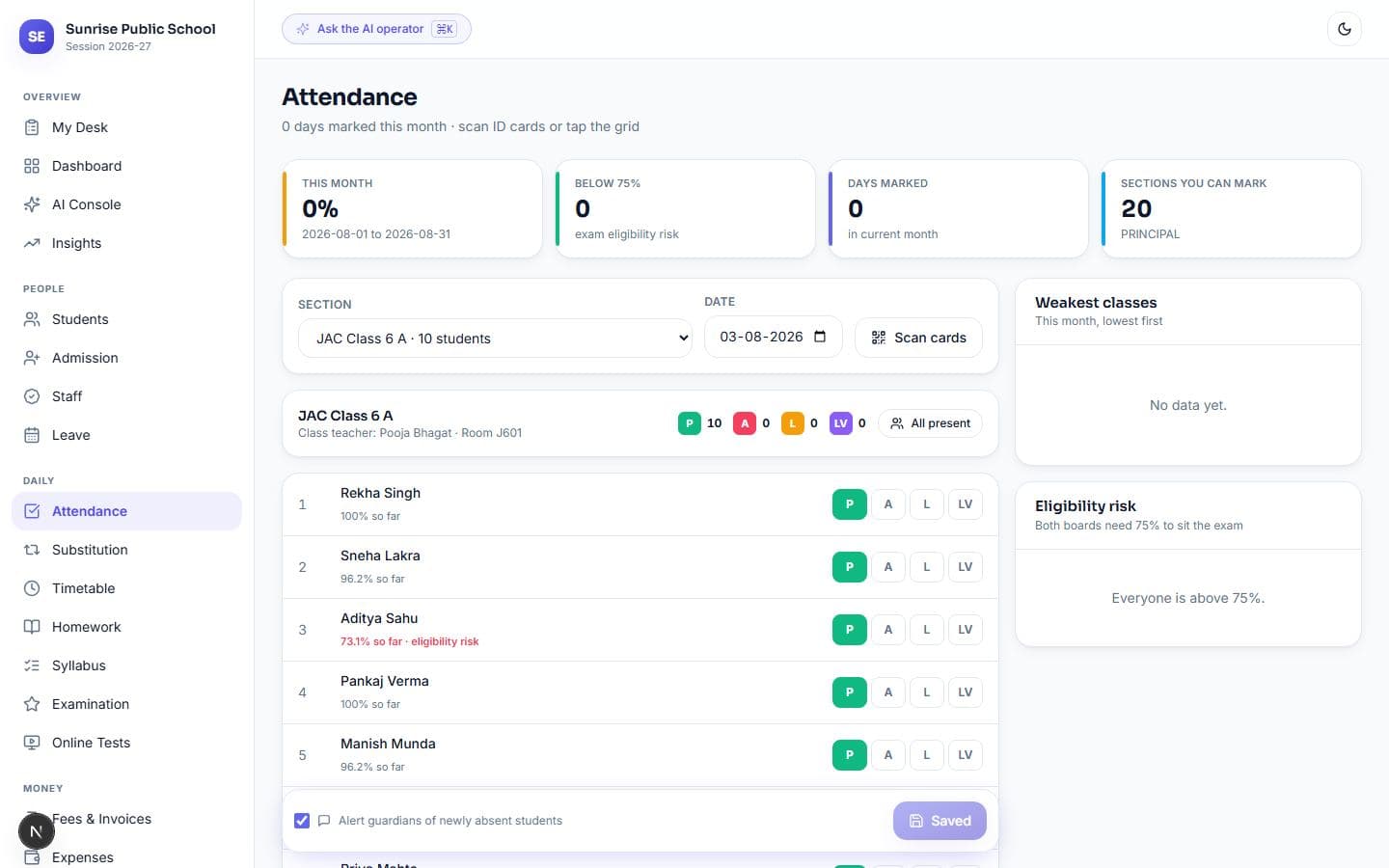
Scan the QR on each ID card, or tap names on a grid. Absentee alerts go to parents the same morning — only for students newly marked absent, so re-saving never double-messages a family.
~40 sec per sectionNo student slips through
Attendance, fee ageing and result trend combine into one risk score per student. Both boards need 75% attendance to sit the exam — the system flags a child in September, not in February.
flagged earlyA wrong entry is not a fight
Every change is logged with what the record looked like before and after, who did it, and when. Fee entries, attendance and invoices can be undone for 24 hours — the original stays in the log, marked reverted. People are deactivated, never deleted, because their names are still on receipts and marksheets that have to keep resolving.
24-hour undoAbsent teachers, covered by first bell
Mark a teacher away and every period they were due to take appears as uncovered — computed from attendance and the timetable, not entered by hand. Free teachers are offered in order of how little cover they have already done.
before 8 a.m.Parents stop calling the office
Attendance, fees, receipts, marks and notices are on the parent's phone. They can even message the school WhatsApp number and get an answer about their own child, instantly, without an app.
self-servePaperwork prints itself
Invoices, receipts, marksheets in each board's own format, payslips, admit cards and ID cards — all on the school letterhead with your logo, generated on demand.
8 documentsThe month closes itself
Invoices for every student in one press. Payroll from attendance, with loss of pay calculated. A day book where every rupee in and out is one line, and an income-versus-expenditure view a trustee can read.
one pressAsks your school a question. In your language, and writes nothing on its own.
"How many children are behind on fees" — answered from the school's own records, in ten Indian languages and Hinglish. It never writes a database query; sixteen questions are written by hand, and a key it invents is refused.
- How many students are on the roll?
- What is today's attendance?
- How much fee money is outstanding?
- Who is behind on fees?
- How did the last exam go, and which subjects did worst?
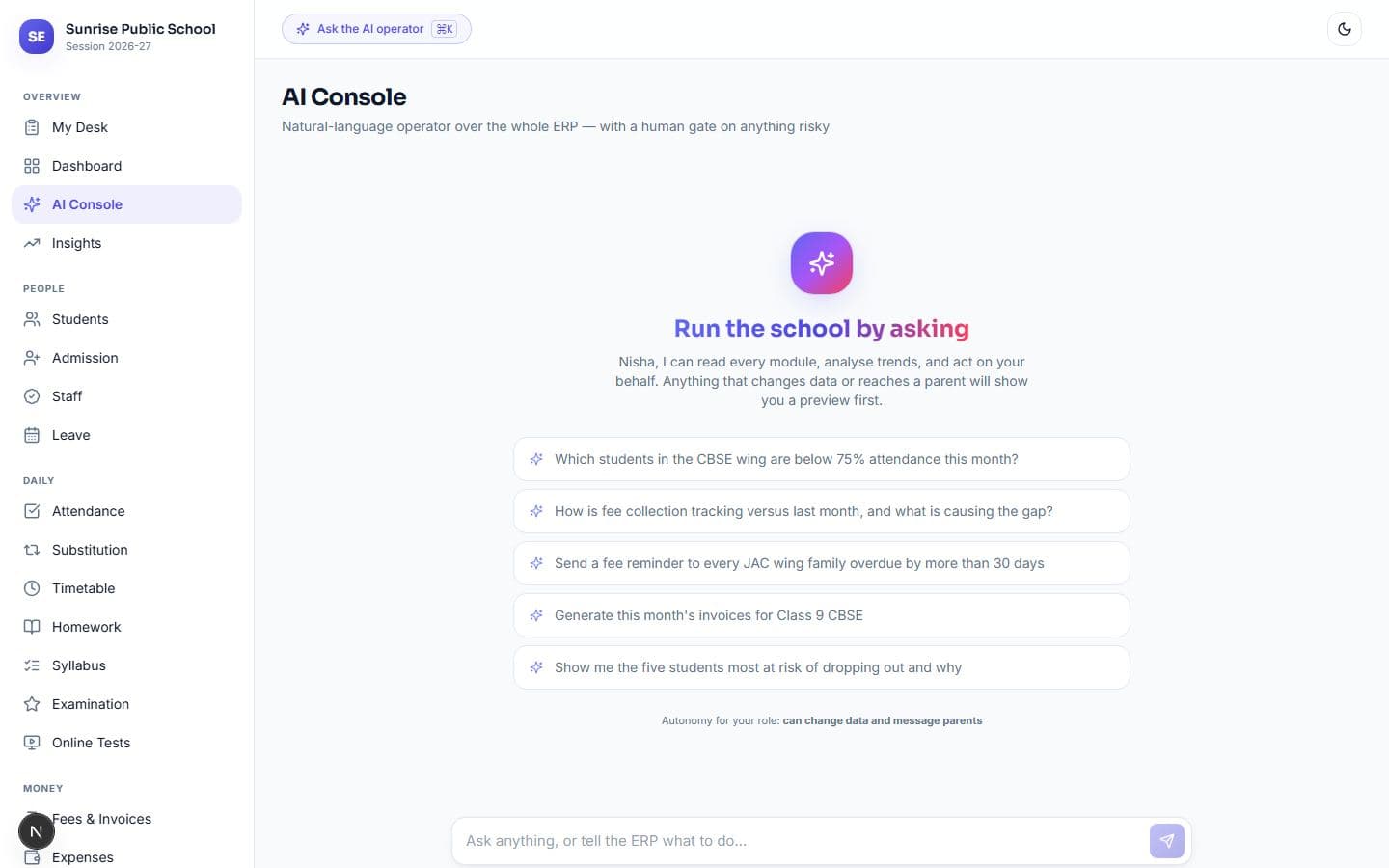
It never writes a query
The assistant picks one of the school's sixteen prepared lookups and reads the answer from the database. It never makes a figure up, and it can only see what the person asking can already see.
Contact details never leave the school
Phone numbers, emails and ID-shaped strings are stripped before anything is sent out for an answer. Report comments and fee reminders land as drafts — nothing it writes reaches a parent without somebody pressing send.
Every screen below is the working product
Real data from a 200-student demo school running both boards. Nothing here is a mock-up.
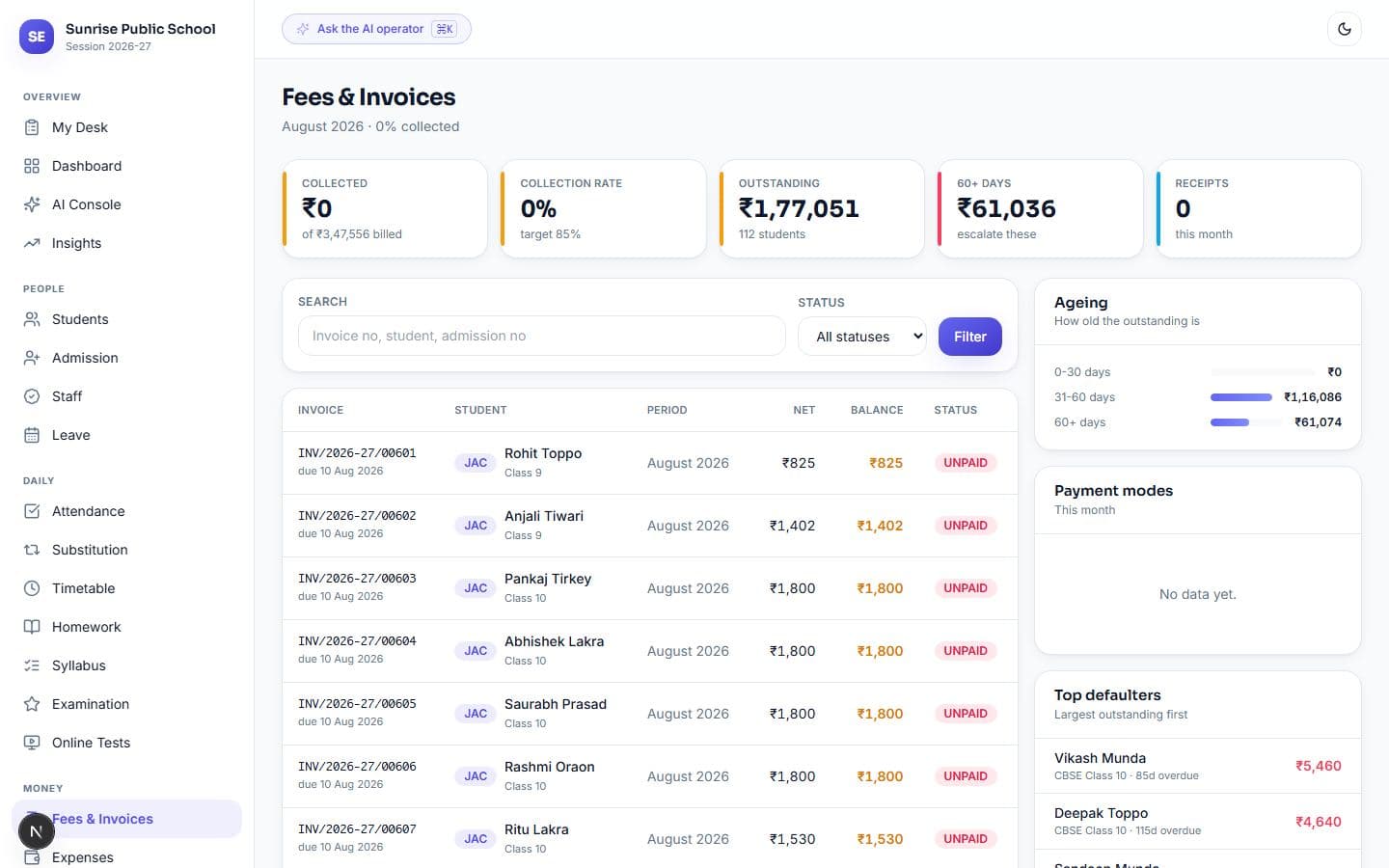
Fees
Fees — collection rate, ageing buckets, and the defaulters worth calling first.
Attendance
Attendance — QR scanning, a tap-to-cycle grid, and everyone below the 75% exam line.
AI Console
Ask in plain language. It picks one of sixteen prepared lookups and reads the answer straight from the school's records.
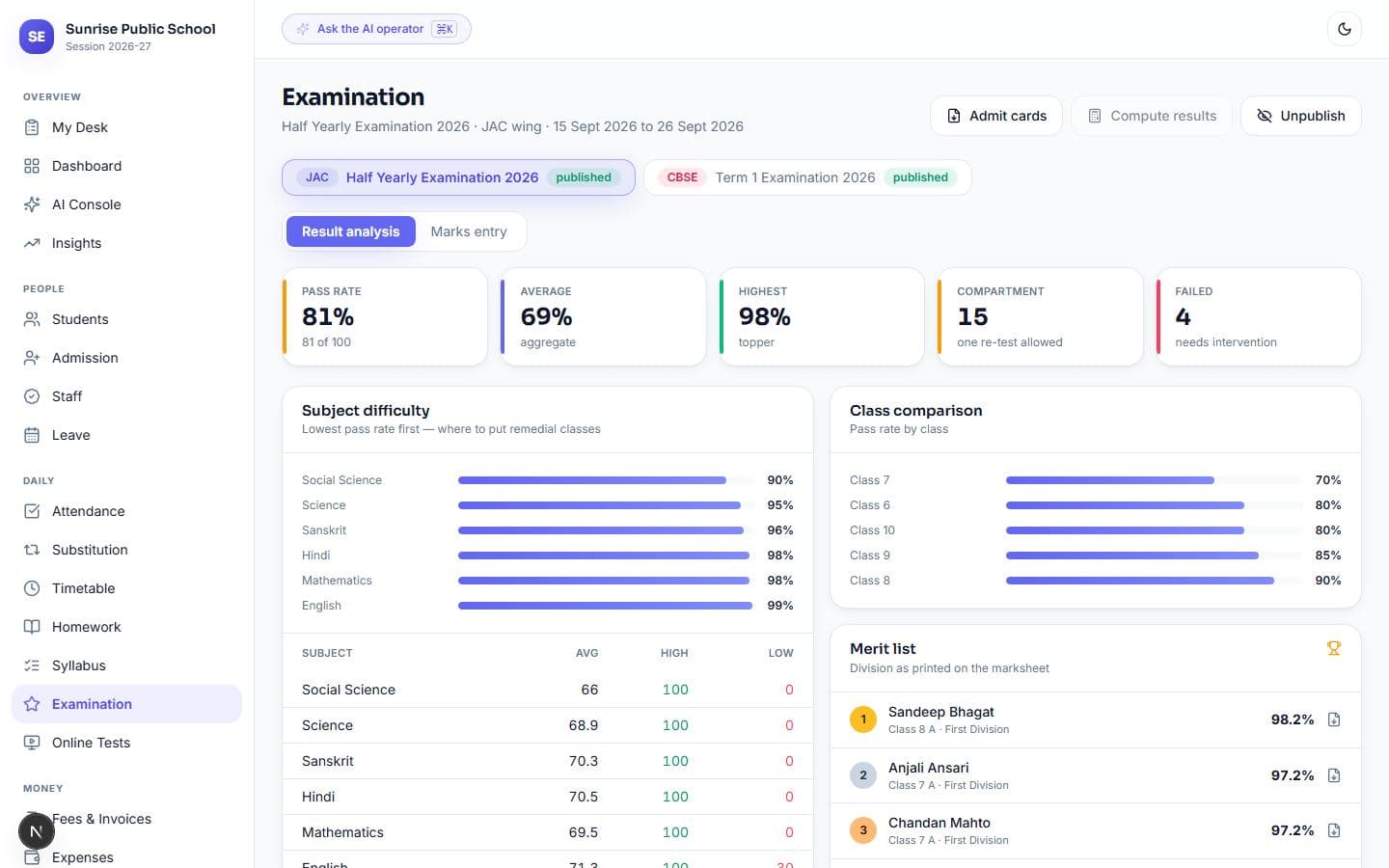
Examination — JAC prints a Division, CBSE prints grade and CGPA. Subject difficulty ranked.
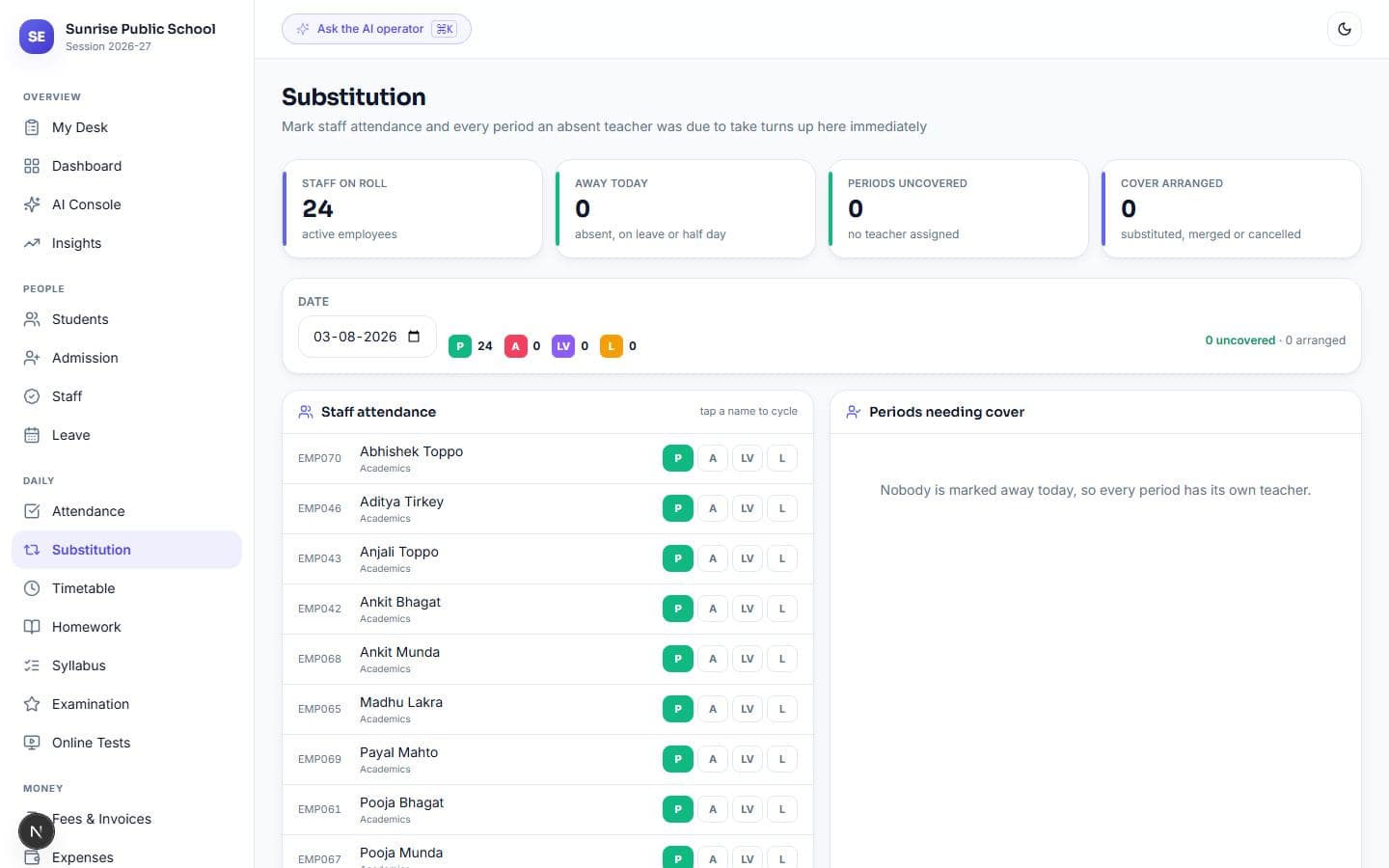
Substitution — mark a teacher away on the left, their uncovered periods appear on the right.
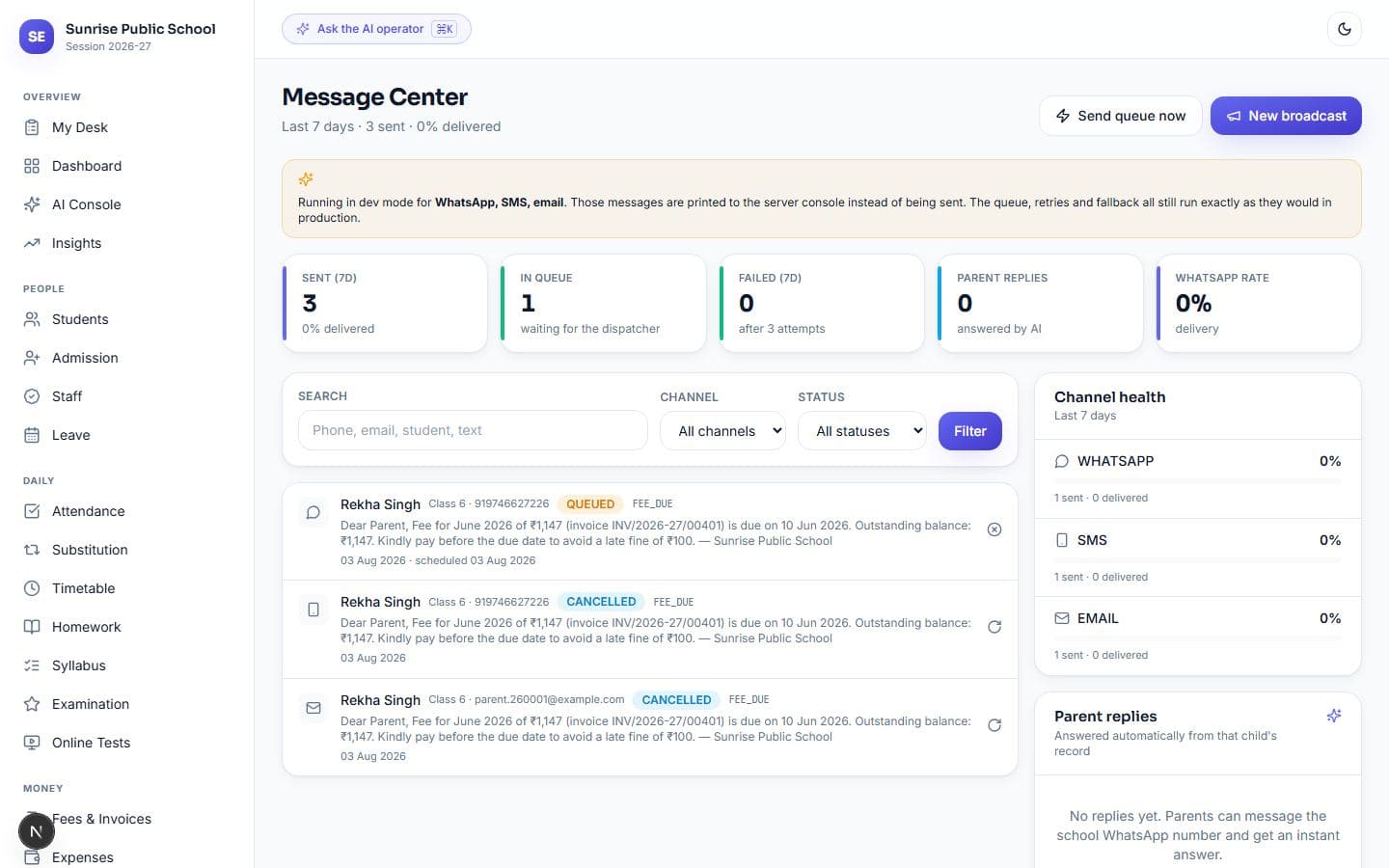
Message Center — every message, its channel, and whether it was delivered or read.
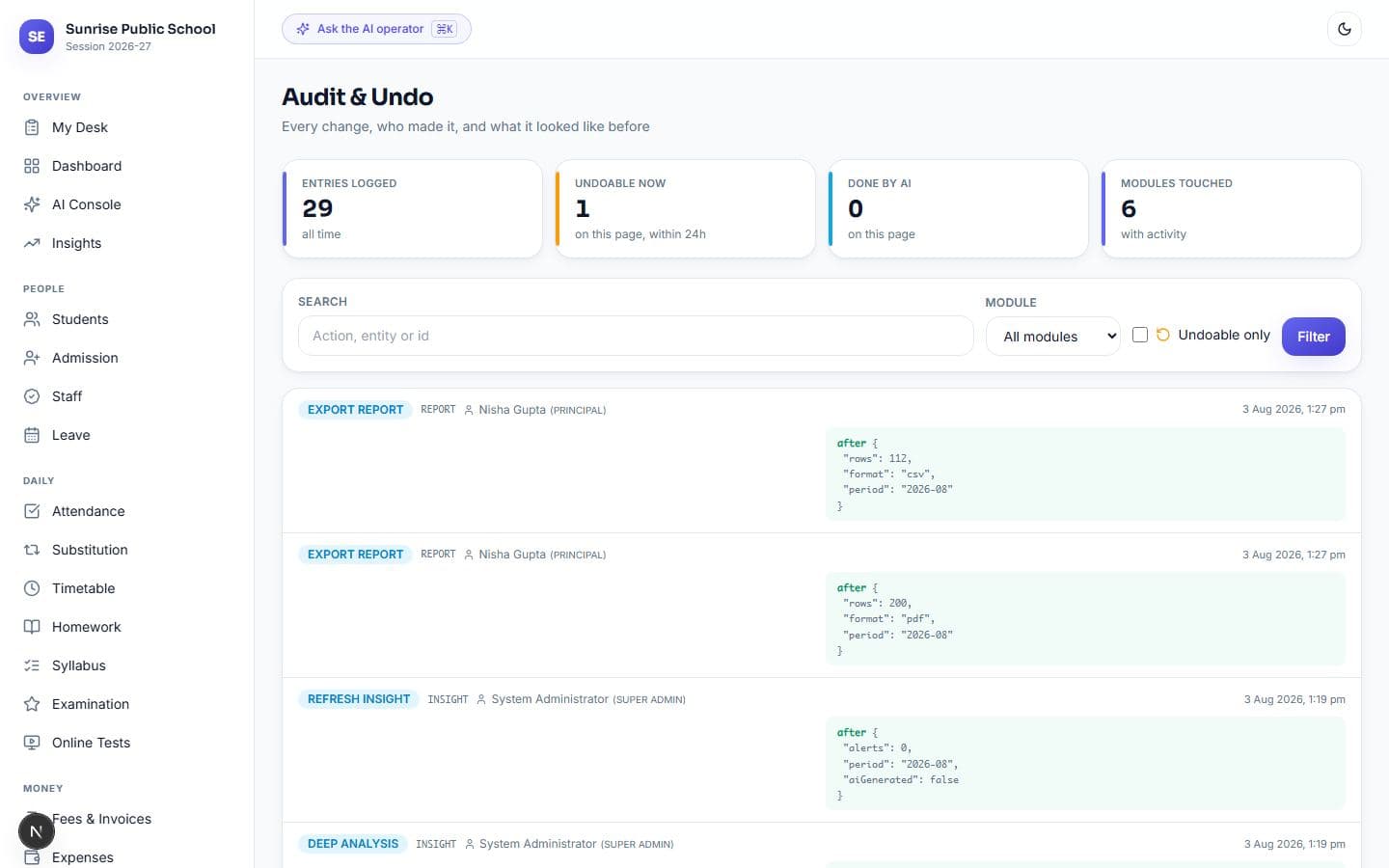
Audit & Undo — what changed, who changed it, and the before-and-after of the record.
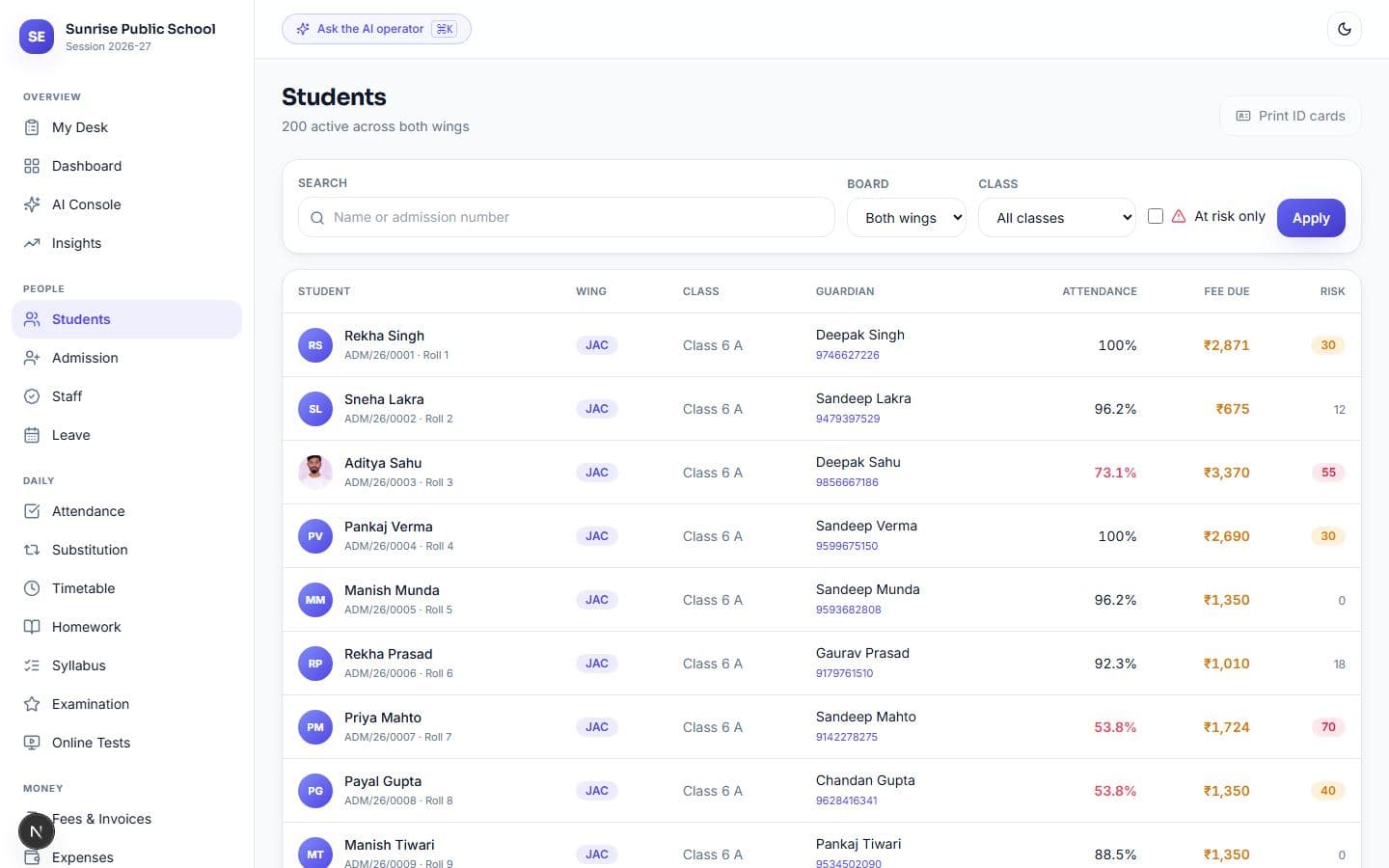
Students — searchable across both wings, with attendance, dues and risk on every row.
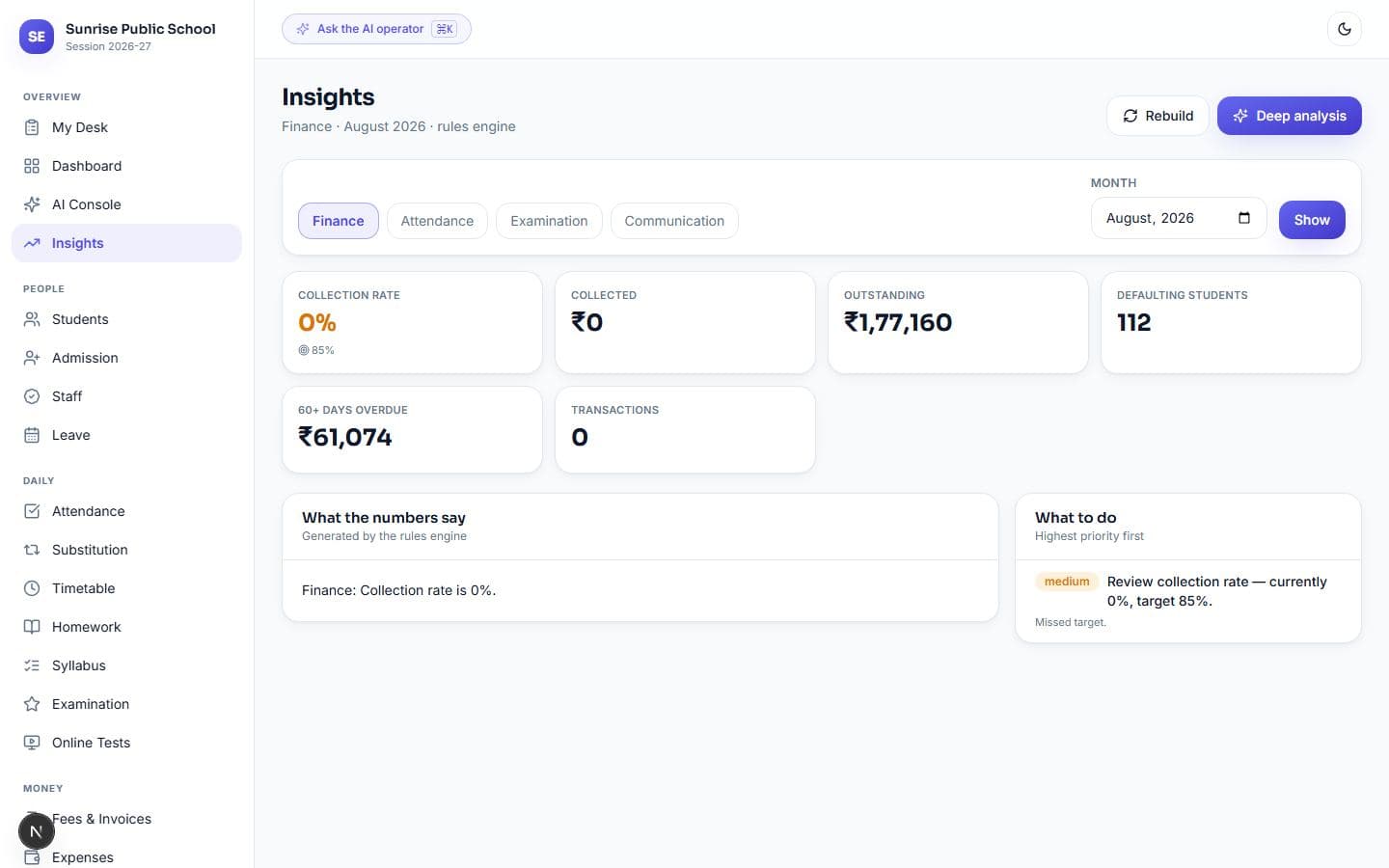
Monthly analysis per department, with unusual months flagged against twelve months of history.
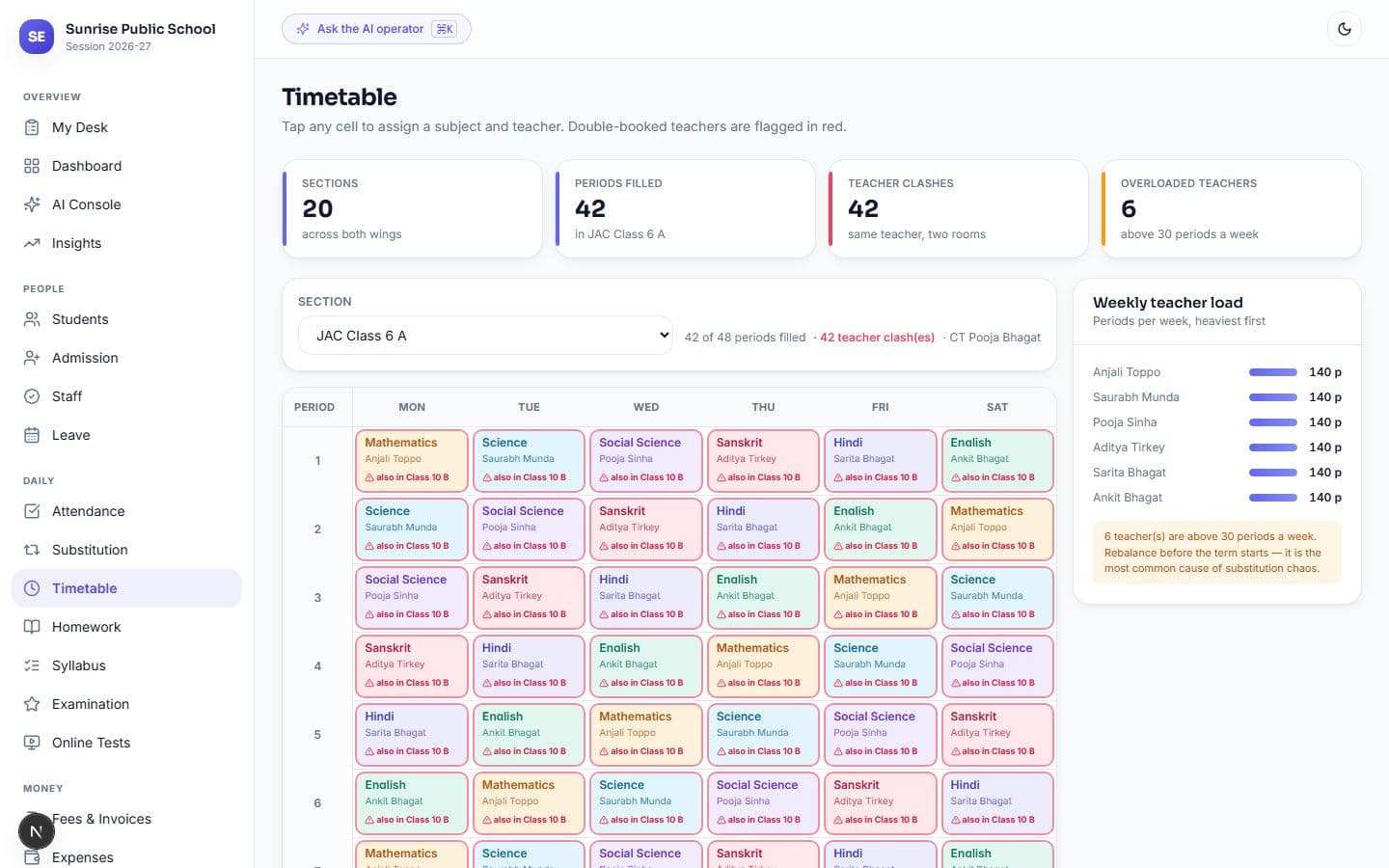
Timetable — generated in seconds. Where it cannot fill a slot, it says why, teacher by teacher.
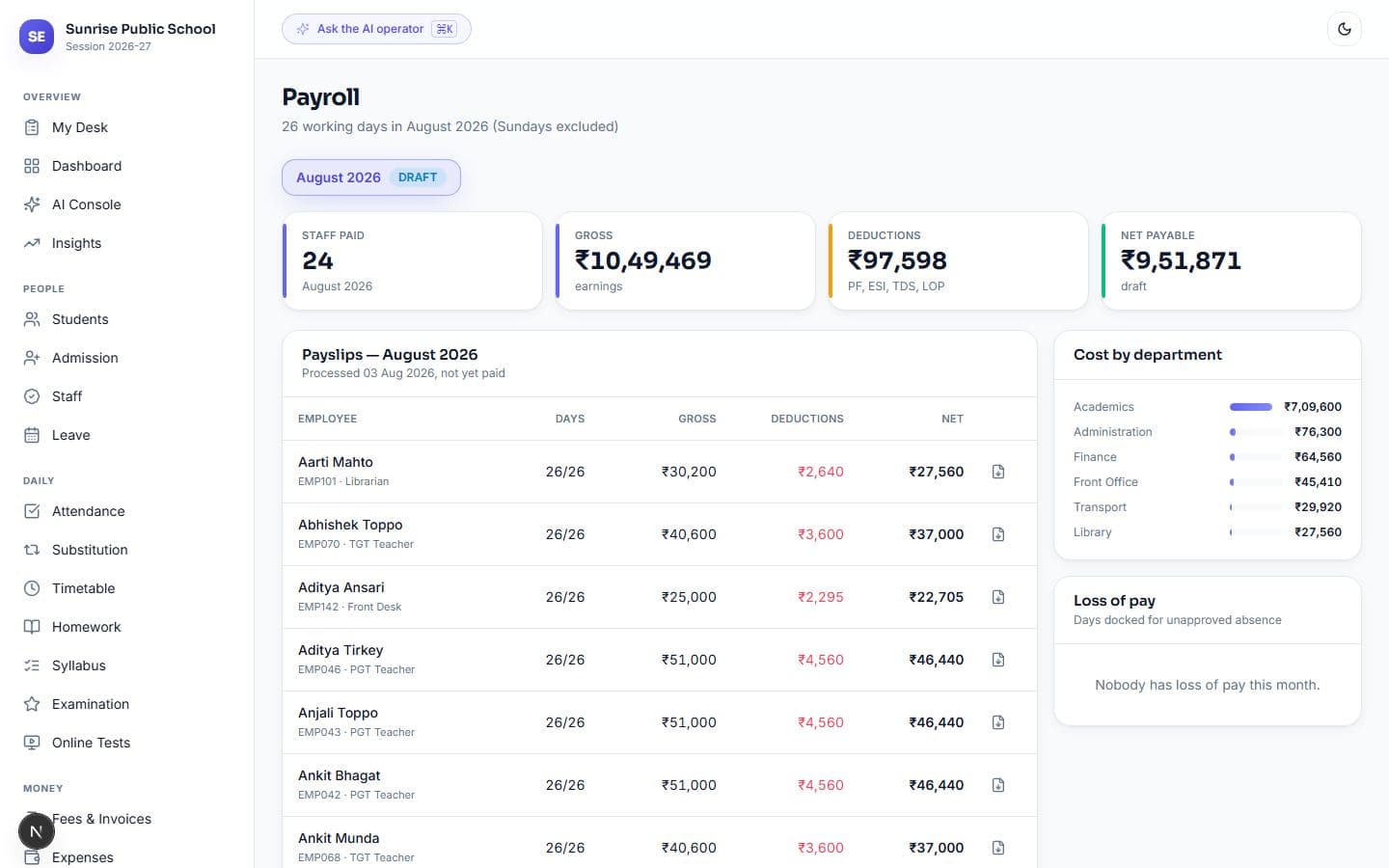
Payroll — salary computed from attendance, with loss of pay applied.
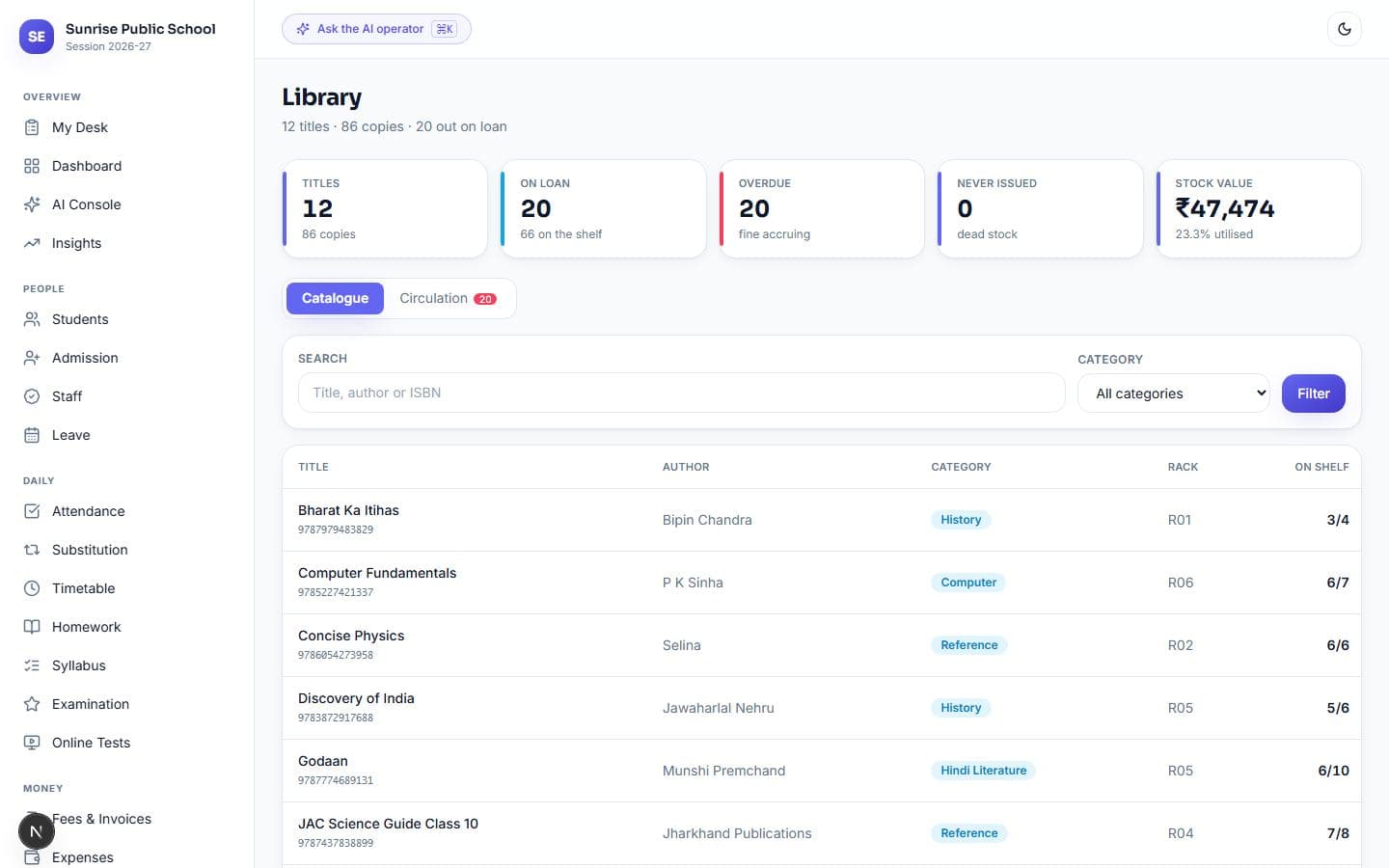
Library — issue, return and fines, with overdue books flagged each morning.
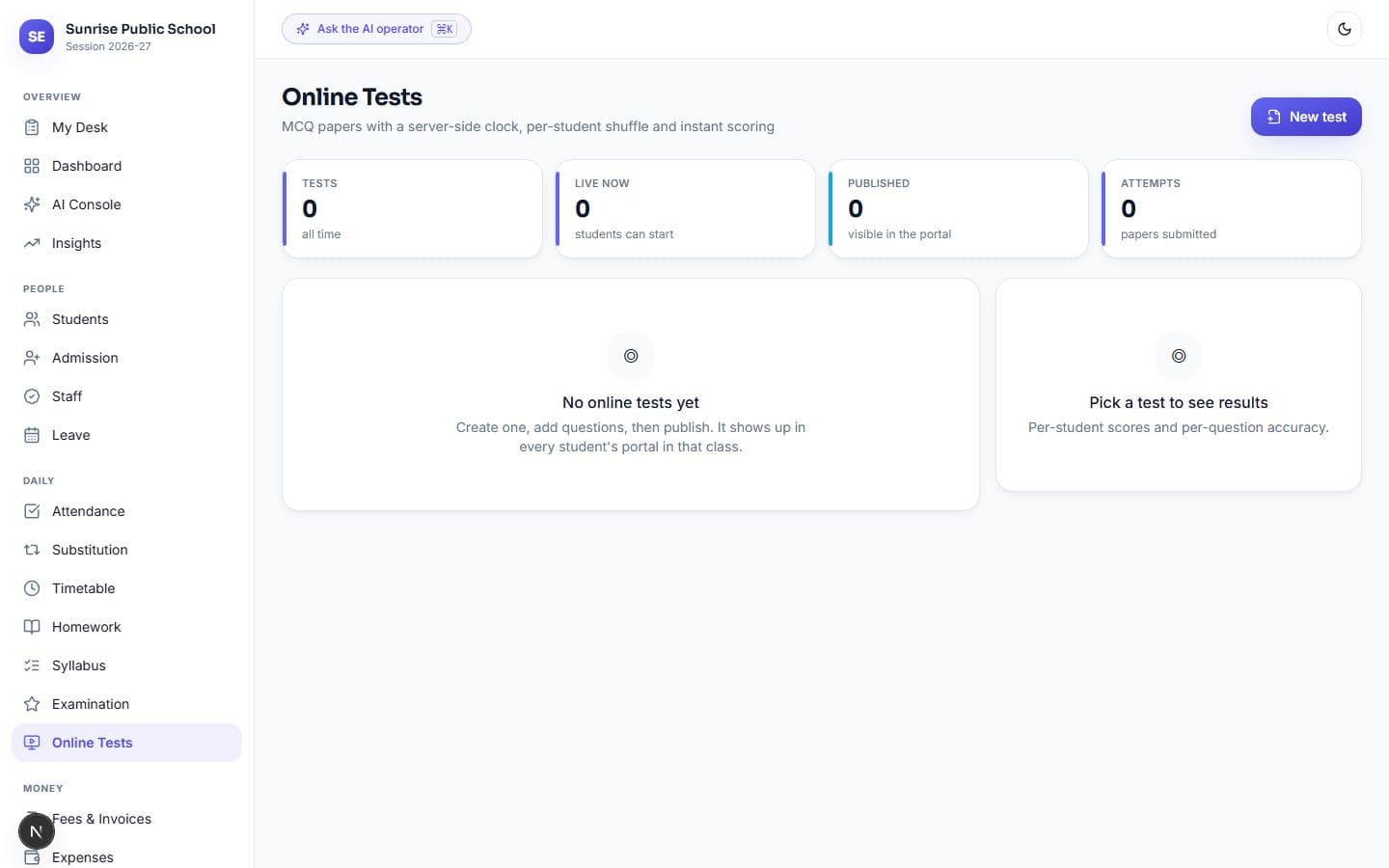
Online tests — server-side clock, answers never sent to the browser while a paper is open.
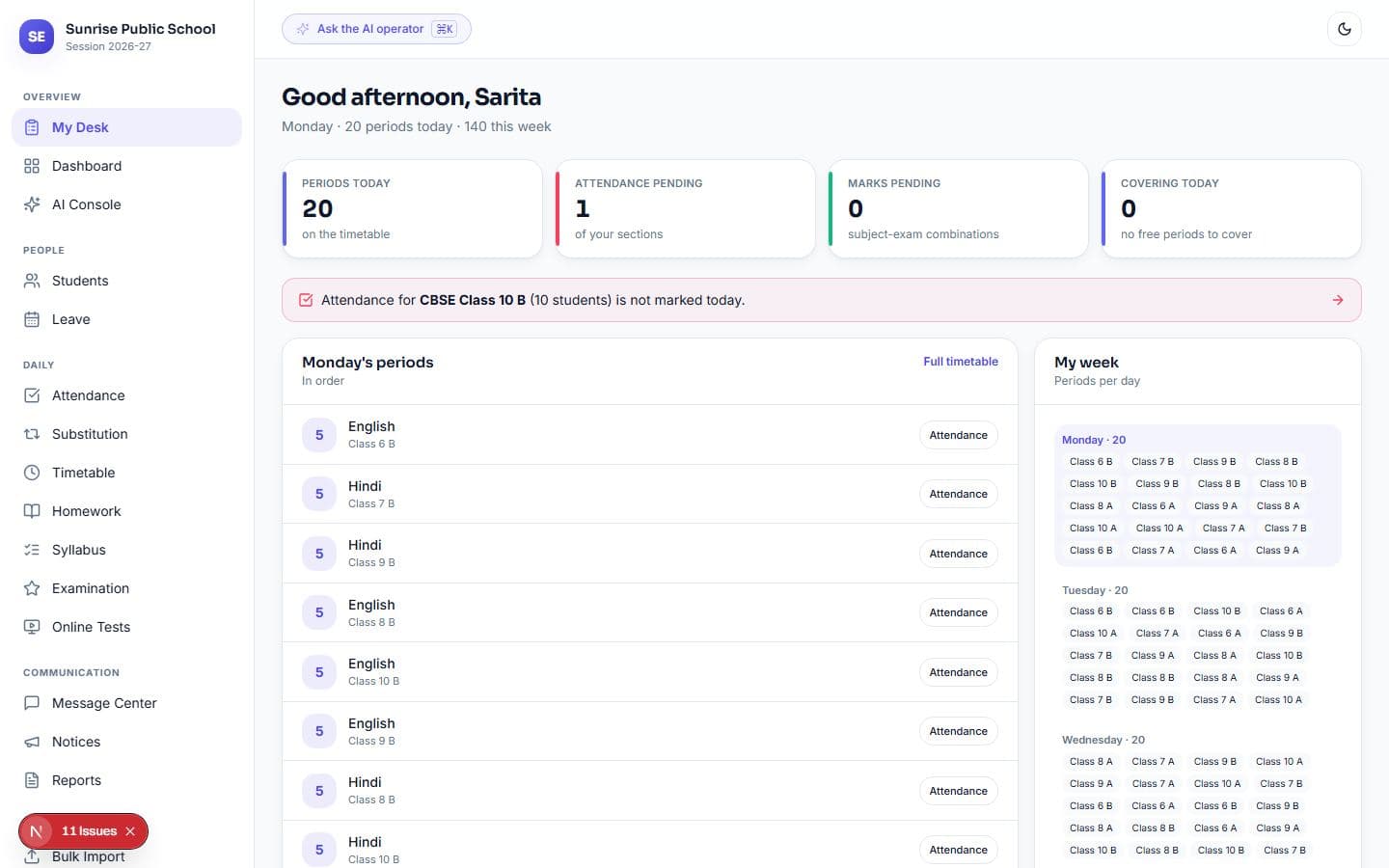
My Desk — what this teacher owes the school today, and nothing else.
Where the hours actually go
- 06:00System
Fee reminders go out on their schedule. Late fines applied. Overdue library books flagged. Stale payment links expired.
- 07:45Head of department
One message listing every period with no teacher today — not eight separate alerts that get muted.
- 08:10Class teacher
Opens My Desk: today's periods, which sections still need attendance, whose marks are pending, and the students in their own class who need watching.
- 08:20Parent
Gets an absence alert on WhatsApp before the second period starts.
- 11:30Accounts
Collects a fee, and the receipt PDF reaches the parent before they leave the counter.
- 20:00Principal
One page: attendance, money collected today, new admissions, students at risk, messages still queued.
Parents and students get their own app — no download
A separate product, not the staff screens shrunk down. Thumb-reachable, and every number stated the way a parent says it — "₹2,871 pending", not "outstanding receivable".
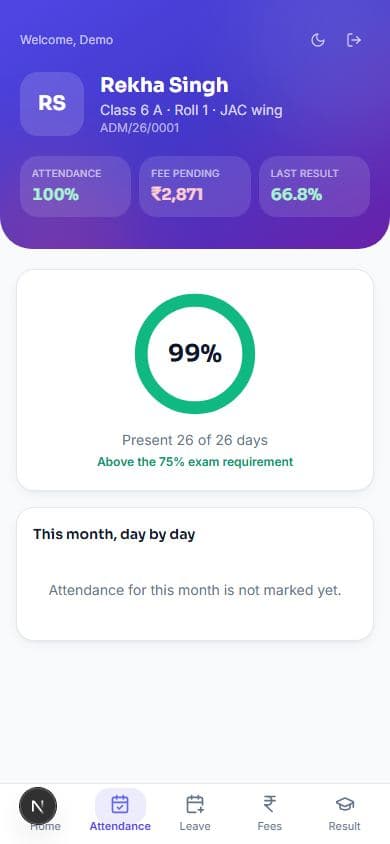
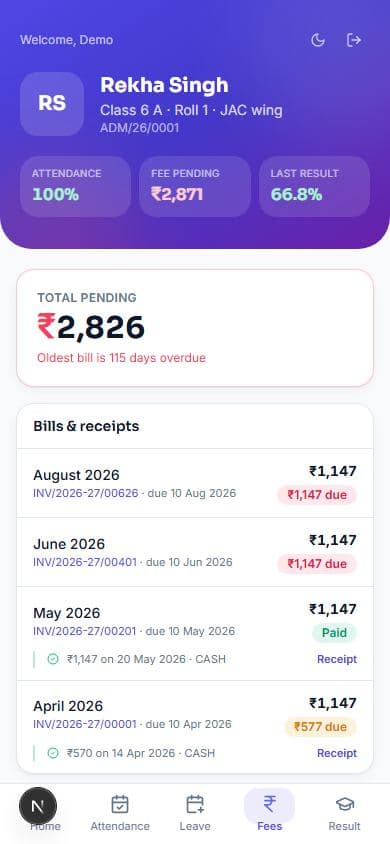
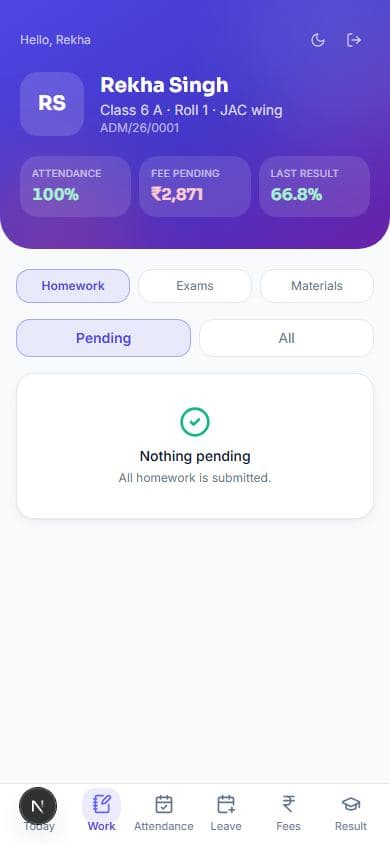
Leave, with the parent in the middle
A student applies, and it waits for their own guardian to confirm before the school ever sees it. A child cannot quietly book themselves a day off; a parent applying directly skips the step, because their consent was the thing being checked.
A parent sees only their own child
The student is resolved from the signed-in account, never from the web address. Editing the link to another family's receipt returns a refusal, not a document. A child who has left drops off the list, and last year's parent stops being able to read the record.
Everything a school runs on
Admission
05- Enquiry pipeline with follow-ups
- Admission form, seat check
- Conversion rate by source
- Transfer certificate
- Bulk promotion
Students
06- 360° profile
- Guardians and contacts
- Photo upload
- Risk scoring
- ID cards with QR
- CSV bulk import
Attendance
04- Student — QR and manual
- Staff attendance
- Substitution cover
- Leave, three-step approval
Academics
06- Timetable — generated in seconds, explains an unfilled slot
- Homework and submissions
- Extra and online classes
- Doubt classes the class votes for
- Syllabus against planned dates
- Study material
Examination
05- Marks entry grid
- Board-correct marksheets
- Result analysis
- Admit cards
- Online MCQ tests
Fees & Accounts
06- Fee structure per class
- Invoices and receipts, nothing edited
- Defaulter ageing
- Online payment — school's own Razorpay account
- Expense vouchers
- Day book and ledger
HR & Payroll
04- Staff register
- Salary structure
- Payroll with loss of pay
- Appraisal on real figures
Operations
05- Library — title and copy tracked separately
- Transport — vehicle papers, live GPS, honest ETA
- Hostel — bed-level occupancy, night roll call
- Store & assets — weighted-average stock, append-only ledger
- Front office, gate pass
Communication
04- WhatsApp, SMS, email
- Automatic event triggers
- Broadcast with live count
- Two-way parent replies
Four decisions most school software gets wrong
- 01
Two boards, one school
JAC and CBSE run side by side, not as two installations. Each keeps its own grading, pass rule, compartment allowance and marksheet format — a JAC child gets a Division, a CBSE child gets grade and CGPA, from the same button.
- 02
A doubt class the class votes for
One child stuck on a chapter is a conversation after the bell. Eleven children stuck on it is a class worth an hour — and until now no teacher had a way to tell those apart. A student raises the topic, the whole section can add themselves, and the teacher's queue is sorted by how many are actually waiting. Scheduling it takes one press, online or in school.
- 03
Messages that survive a bad network
Nothing sends inline. Every message queues, retries three times with backoff, and falls back from WhatsApp to SMS to email — but never sends the same notice twice. A message that couldn't go out is written down with its reason — no number on file, opted out, a duplicate — so "we never told them" can be told from "we had nowhere to tell them". Quiet hours are a hard stop at 21:00; a message queued inside them waits rather than disappearing.
- 04
Online tests you can trust
The clock lives on the server, so changing the phone's time buys nothing. Correct answers never reach the browser while a paper is open. Tab switches are counted and shown to the teacher — but never auto-punish, because a phone notification should not fail a child.
- 05
Money is never silently wrong
Online payment is marked paid only by a signature-verified message from the bank's gateway — reloading a success page settles nothing. Reversing a receipt needs a higher permission than collecting one, and every reversal is logged.
What it needs to run
- Access
- Any browser. Nothing to install — staff on a laptop, parents on a phone.
- Roles
- Eleven, from principal to gatekeeper. Each sees only their own modules, checked on the server every time.
- Documents
- Invoice, receipt, marksheet (both boards), payslip, admit card, ID card sheet, reports as PDF and Excel.
- Your branding
- Upload the school logo once; it appears on every document, with a watermark on money papers.
- Data
- Your existing student and staff lists import from a spreadsheet. Bad rows are shown before anything is written.
- WhatsApp & SMS
- Connects to your own WhatsApp Business number and SMS account. Until then the system runs and queues normally.
- Online fees
- Razorpay. Parents pay from a WhatsApp link; the receipt issues itself once the bank confirms.
The full catalogue
Eighteen pages, every screen, in English or Hindi. Useful if you need to show it to a trustee or a committee.
School management software in your city
A page for each city, written around its local board, fee habits and staff.
What schools ask before deciding
We already use software for fees. Do we have to replace it?
Not immediately. Most schools start with attendance, parent communication and the parent portal — the parts their current software does not cover — and move fees across at the start of a session, when the books close cleanly anyway.
How long before it is running on our data?
A few days to load your students, staff and fee structure once you send the lists. Going fully live across every module takes longer, and we roll modules out in the order that pays back fastest rather than all at once.
Our office staff are not comfortable with computers.
Daily work is built around three clicks — attendance is a tap grid or a QR scan, fee collection is a search and an amount. Training happens on site with your own data, and we stay available daily through the first month.
Does it handle JAC and CBSE together?
Yes, in one instance rather than two installations. Each board keeps its own grading, pass rule, compartment allowance and marksheet format, and the same button prints the correct document for each child.
What if the internet fails during school hours?
Messages queue rather than fail, retry three times, and fall back from WhatsApp to SMS to email — without ever sending the same notice twice. Nothing is lost; it arrives when the connection returns.
How much does the school ERP cost?
One flat price per school, not per student: Starter ₹999/month (up to 300 students), Standard ₹2,999/month (up to 1,200) and Institution ₹7,999/month (unlimited), GST extra. Yearly billing costs ten months' price. Every plan starts with a 14-day free trial and no card.
Is there a parent app, and do parents have to download it?
Parents and students get their own portal that opens on the phone in a browser — nothing to download from the Play Store. It shows attendance, dues, receipts, marks and notices for their own child only, and absence and fee alerts also reach them on WhatsApp.
Who owns the data?
Your school. Everything exports to Excel whenever you want it, and the system is built and supported by the people who wrote it — not a reseller. Changes your school needs get built rather than filed as a feature request.
See it running on your own school's data
Send one class list and one month of fee records. Within a few days the system is loaded with your own students, your own defaulters and your own timetable — and you can judge it on figures you already recognise, not on a demo school.
Walkthrough takes about 30 minutes, on a call or in person.
One school. Nine disconnected systems.
Most schools run on a patchwork of registers, Excel sheets, WhatsApp groups, and separate apps. Data never matches, work is repeated, and the principal has no live picture.
- Fees tracked in one register, dues in another
- Attendance on paper, marks in Excel
- Notices lost in scattered WhatsApp groups
- Report cards built by hand for weeks
- No single, live view for management
Vidyalaya replaces all nine with one connected platform — every department, every portal, one source of truth.
From data entry to a live school — one flow
- 01
Admin enters once
Students, classes, fees, and staff are set up a single time.
- 02
Teachers mark daily
Attendance, marks, homework — from any device.
- 03
System automates
Fees, report cards, reminders, and reports generate themselves.
- 04
Parents & heads see live
Parent app and management dashboard update instantly.
Vidyalaya vs the old way
| Excel & Registers | Vidyalaya | |
|---|---|---|
| Fee collection | Manual, dues missed | Online + auto reminders |
| Attendance | Paper, slow | App / biometric, instant |
| Report cards | Weeks of work | Generated in minutes |
| Parent updates | Phone calls | Live parent app |
| Management view | No live data | Real-time dashboard |
| Setup time | — | Live in days, not months |
One platform, every role
Trustee / Principal
Live dashboards across fees, admissions, and attendance — the whole school on a phone.
Teachers
Mark attendance, enter marks, share homework in seconds — less paperwork, more teaching.
Accounts
Online fees, auto receipts, due tracking, and clean financial reports.
Parents
Pay fees, check attendance and results, get notices — all in one simple app.
What it costs
One price for the whole school. No charge per teacher, no module you have to buy twice, and the trial needs no card.
Starter
For a single small school finding its feet.
- Up to 300 students
- Up to 30 staff accounts
- 11 modules
- 14 days free, no card
Standard
Most schools take thisThe full academic and accounts stack.
- Up to 1,200 students
- Up to 120 staff accounts
- 19 modules
- 14 days free, no card
Institution
Every module, no caps, priority support.
- Unlimited students
- Unlimited staff accounts
- Every module
- 14 days free, no card
Prices are per school, per month, exclusive of GST. Moving up is charged only for the days left in the period; moving down costs nothing and starts at renewal.
Start your 14-day free trial
No credit card needed. Set up your school, explore every module, and see the parent app in action. Book a guided demo any time.
Vidyalaya — School ERP Software for JAC & CBSE Schools in India
Vidyalaya is a cloud school ERP software built for Indian schools that want to run everything — admissions, fees, attendance, exams, timetable, transport, and parent communication — from one simple platform. With 22 connected modules and 774 operations behind them, your whole school works from a single source of truth that the principal can see live from a phone, instead of juggling registers, spreadsheets, and separate apps.
Whether you run a small private school, a coaching institute, or a multi-branch group, Vidyalaya scales with you. It is affordable school management software with transparent pricing, quick setup, and a genuinely usable parent app — the three things schools tell us matter most.
Everything your school needs in one platform
- Admission and enquiry management
- Fee management with online payment, receipts, and due reminders
- Student and staff attendance (app or biometric)
- Exam, grading, and automated report cards
- Timetable and substitution management
- Transport and route tracking
- Parent app for fees, attendance, homework, and notices
- Role-based access for admin, teachers, and parents
Why schools move from Excel to a cloud ERP
As a school grows, manual systems break. Fee dues get missed and collections drop. Notices don't reach every parent. Report cards take weeks. Data sits scattered across staff members, and when one person leaves, their files leave too. A cloud school ERP centralises everything, automates the repetitive work, and gives management a real-time view of the entire school.
Cloud vs on-premise school software
On-premise software means buying and maintaining your own servers — high upfront cost and an IT headache that becomes your problem. Vidyalaya is cloud SaaS: updates, backups, and security are handled for you, it works on any device, and you can start in days, not months. For nearly every Indian school, cloud is the practical choice.
Built for the parent app experience
The parent app is what most of your users touch every day, so we built it to be simple. Parents pay fees online, check attendance, see homework and results, and receive notices instantly. High parent adoption means fewer phone calls to the office, faster fee collection, and a school that looks modern and organised to every family.
School ERP software price — flat, per school
Most school ERP vendors charge per student per month, so the bill grows every admission season. Vidyalaya charges one flat price per school: Starter ₹999/month for up to 300 students, Standard ₹2,999/month for up to 1,200, and Institution ₹7,999/month with no cap — GST extra, no per-teacher charge. Every plan starts with a 14-day free trial without a card, and you can see a walkthrough on your own school's data before you decide.
Student management system
At its core, Vidyalaya is a complete student information system. Every student's profile, class, section, attendance, fees, marks, and documents live in one record — searchable in seconds. No more digging through registers when a parent calls or the board asks for data.
Fee management software with online payment
Vidyalaya's fee management software handles fee structures, discounts, instalments, online payment, and automatic receipts. Due reminders go out on their own over SMS and WhatsApp, so collections improve without your staff chasing parents one by one.
Attendance tracking — app and biometric
Mark attendance from a phone in seconds, or connect biometric and face-recognition devices for staff and students. Absentee alerts reach parents instantly, and monthly attendance reports are one click away.
Examination and result management
From exam scheduling to grading and automated report cards, Vidyalaya's examination management system removes weeks of manual work. Generate marksheets in your board's format and publish results straight to the parent app.
Bulk SMS & WhatsApp notifications
Send fee reminders, holiday notices, exam schedules, and emergency alerts to every parent through bulk SMS and WhatsApp — no more lost messages in scattered groups. Communication becomes reliable and trackable.
Built for schools, coaching institutes, and colleges
Whether you run a K-12 school, a coaching institute, or a growing multi-branch group, Vidyalaya adapts to your structure. As a founder-led, India-first product, we give personal onboarding and support that large vendors can't — at a price small institutions can actually afford.
AI assistant built in
Vidyalaya includes an AI assistant that drafts the busywork — homework and question papers, report-card comments, fee reminders, and a plain-English analytics summary of your school. Everything comes back as a safe draft you approve, never an action taken behind your back.
Secure, multi-school, and fully audited
Vidyalaya is multi-tenant by design: each school sees only its own data, protected by role-based access across every module. Online fees run on Razorpay, transport has live GPS tracking with parent ETAs, and an append-only audit trail records every change with a 24-hour undo — so nothing is ever silently wrong.
Get started with a free demo
See Vidyalaya running with your classes, fee structure, and students before committing anything. Setup is quick, training is minimal, and our support speaks your language. Book a free demo today and take the first step toward a school that runs itself.